



Most maintenance teams that want to switch CMMS software put it off for the same reason: the fear of losing ten years of asset records and work order history in the move. That fear is reasonable, but it usually points at the wrong thing. Switching is mostly a data job, and you can plan, check and reverse a data job.
This guide covers why more Canadian organizations are choosing a Canadian CMMS, the six steps of a clean switch, and exactly what the Zenith team does for you so your technicians keep working while the records move.
Why it feels hard to switch CMMS software
A CMMS holds three kinds of thing. There is reference data: sites, buildings, assets, parts, vendors and people. There are plans: preventive maintenance schedules and their task lists. And there is history: every work order ever opened and closed.
Reference data and plans are what you run on tomorrow morning, so they have to move cleanly. History is what you look back on, and it can move in full, move in part, or stay behind as a read-only archive. Once a team sees that split, the project stops feeling like one giant risk and becomes three smaller, ordinary tasks.
The other source of dread is the old system itself. Exports are often clumsy, field names are cryptic, and nobody remembers why there are four asset types called “Pump”. That is a cleaning problem, not a reason to stay. It also gets worse every year you wait.
Why Canadian organizations switch CMMS software to a Canadian vendor
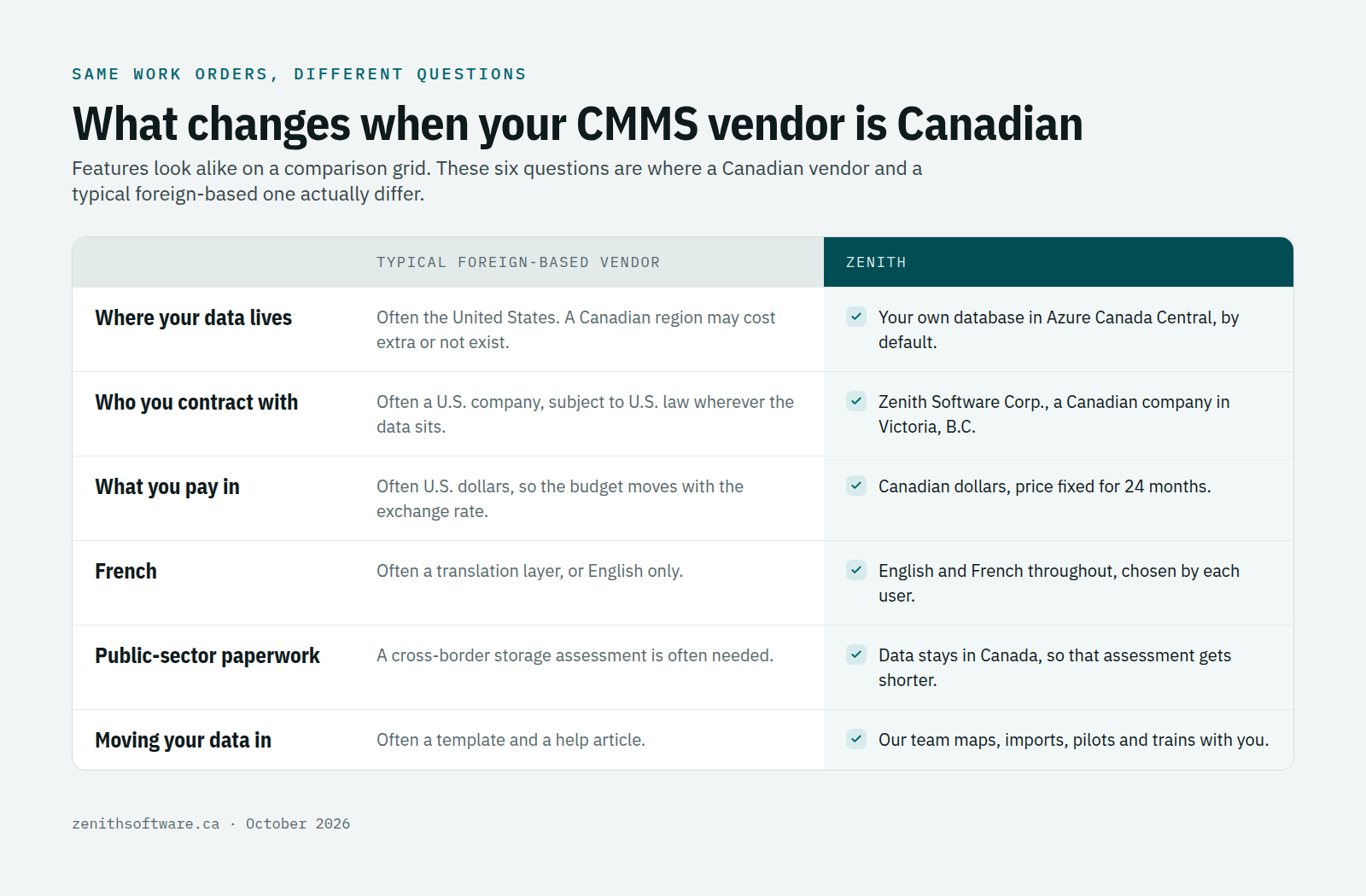
For years the choice of CMMS was mostly about features. Canadian buyers now ask a second set of questions, and they are questions a feature grid cannot answer.
Your maintenance data stays in Canada
A CMMS holds more personal information than people expect: names and contact details of staff and contractors, who was on site and when, sometimes injury or incident notes attached to a work order. Where that information lives matters, especially in the public sector.
- In Nova Scotia, PIIDPA requires public bodies, municipalities and the service providers acting for them to keep personal information in Canada and to access it only from Canada, with limited exceptions.
- In British Columbia, public bodies may store information outside Canada since the 2021 amendments, but sensitive information then needs a supplementary assessment as part of the privacy impact assessment.
- In Quebec, Law 25 requires a privacy impact assessment before personal information leaves the province. That includes other provinces, but assessing a Canadian legal regime is a far shorter exercise than assessing a foreign one.
Zenith keeps each customer in its own database on Microsoft Azure in the Canada Central region. Your maintenance records never leave the country.
Your contract is with a Canadian company
Where data sits is only half the question. The other half is who controls it. Under the U.S. CLOUD Act of 2018, a U.S.-based provider must produce data in its “possession, custody, or control” whether it is stored inside or outside the United States. A CMMS vendor headquartered in the United States is that kind of provider, even when your database sits in Toronto.
Zenith Software Corp. is a Canadian company based in Victoria, British Columbia. Your agreement, your support relationship and your data requests all run through a Canadian business. We cover the hosting layer honestly in the questions below.
French built in, not bolted on
Quebec’s Charter of the French Language says, in section 52.1, that software must be available in French unless no French version exists. For a maintenance team it is simpler than that: a technician who reads a work order in their own language makes fewer mistakes. In Zenith the language follows the user, so one technician can work in French while a colleague works in English on the same work order. Our guide to Quebec’s French language law and your maintenance documents covers the wider rules.
Canadian dollars and Canadian hours
A subscription priced in U.S. dollars changes every time the exchange rate does, which makes a three-year maintenance budget hard to defend. Zenith prices and invoices in Canadian dollars, with the price fixed for 24 months, and our support team works on Canadian time.
Procurement is moving the same way
Since December 16, 2025, the federal Buy Canadian Policy gives Canadian suppliers additional points in large federal bids. It mainly affects big contracts for now, but it shows where public buyers are heading. Provinces, municipalities, school boards and hospitals are asking the same question in their own tenders.
How to switch CMMS software: six steps
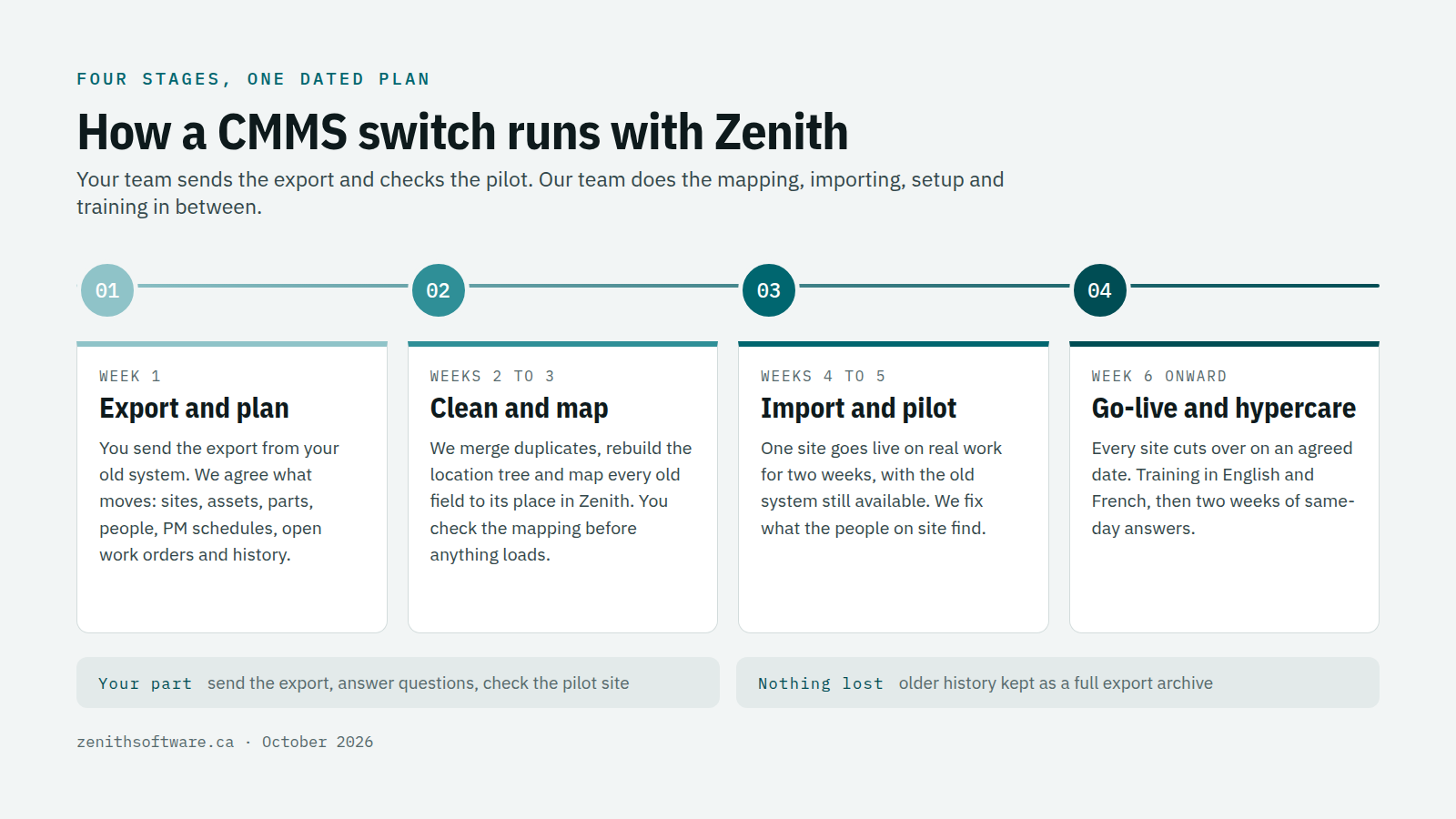
Every clean switch follows the same six steps. The order matters more than the speed.
1. Decide what moves
List what you will carry over: sites and locations, assets, parts and stock levels, vendors and contractors, people, preventive maintenance schedules, and open work orders. Then decide about closed history. Most teams import the last two or three years in full and keep an export of everything older. Before you decide, check how long you must keep records — our guide to maintenance record retention in Canada sets out the common periods.
2. Export everything from the old system
Before you switch CMMS software, ask your current vendor for a full export in Excel or CSV, plus any attachments. Do it early: read your contract for the export clause and the notice period, because some vendors charge for exports or switch off access on the day the subscription ends. If a clean export is impossible, standard reports exported to Excel are enough to work from.
3. Clean and map the data
This is where most of the value sits. Merge duplicate assets, settle on one naming pattern, rebuild the location tree from site to building to floor to room, and retire records for equipment that left years ago. Then map each old field to its place in the new system. A spreadsheet that has drifted for a decade is normal; our article on CMMS vs Excel explains why it drifts.
4. Import and check with one site
Load one site first and let the people who know it best check it. Can they find their assets? Do the PM schedules fall on the right weeks? Do open work orders point at the right equipment? Fix the mapping, then load the rest.
5. Run a short pilot, then cut over
Run the new system on real work for a fixed period, then pick a cut-over date. On that date, freeze new work in the old system, carry across anything still open, and switch requesters to the new link. Keep the old system read-only for a few months in case someone needs to look something up.
6. Train, then stay close
Train administrators and supervisors on setup and planning, and train technicians and requesters on the few screens they use every day. The first two weeks after go-live are when small questions appear, so plan for someone to answer them quickly. Our list of CMMS implementation challenges covers what usually goes wrong.
How Zenith and our team switch your CMMS software for you
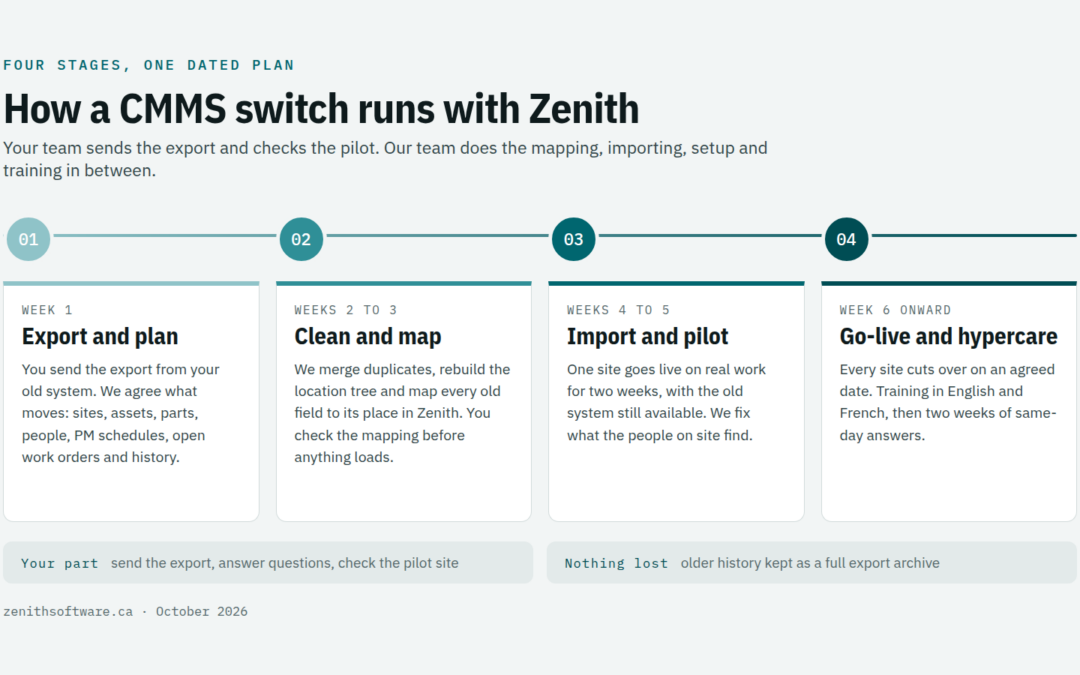
You do not have to run those six steps yourself. When you switch CMMS software to Zenith, our implementation team does the heavy lifting and your team stays focused on maintenance.
- We take your export as it is. Send us whatever your old system produces, or the spreadsheets you keep alongside it. We sort out the format.
- We clean and map it with you. We propose the location tree, asset naming and field mapping, then walk your team through it before we load anything.
- We import and validate. Assets, locations, parts, vendors, people, PM schedules and open work orders go in through a guided import that checks every row before saving it.
- We set up your environment in Canada. Your own database in Azure Canada Central, Microsoft sign-in configured, roles and permissions set for your teams.
- We run the pilot with you. Two weeks on real work at one site, with both systems available, so nobody has to trust the new one blind.
- We train your people in both languages. Two live sessions, one for administrators and one for requesters, recorded for reuse, with quick-reference guides in English and French.
- We stay close after go-live. Two weeks of hypercare, when we answer questions the same day.
Your team’s part is small: send us the export, answer questions about how you work, and check the pilot site. Implementation starts from $1,280 CAD and we quote it up front, and the editions and prices are on our pricing page. Nothing is ever deleted when you change editions later. Not sure which edition fits? Our guide on how to choose a CMMS edition for your industry walks through it sector by sector.
Questions to ask before you switch CMMS software
Can we keep our work order history?
Yes. Most teams bring two or three years into Zenith so trends and repeat failures stay visible, and keep the full export as an archive. If you need everything in the new system, we can import it all.
What if our old vendor will not give us an export?
Read your contract first; most include a data export right. If the export is poor, reports saved to Excel are usually enough. We can rebuild an asset register from PM reports and work order lists.
Do we have to switch CMMS software at every site at once?
No. Multi-site organizations often move one region or one building type at a time. Each site follows the same plan, and the first one sets the pattern for the rest.
Is Zenith hosted in Canada?
Yes. Each customer has its own database on Microsoft Azure in the Canada Central region, with backups and monitoring included. Zenith is a Canadian company; Microsoft provides the data centre. If your privacy officer wants detail on how we protect data at each layer, we will walk them through it.
How long does it take to switch CMMS software?
It depends on how clean your data is and how many sites you have. For a single organization with a reasonable export, a typical plan runs six to eight weeks from kickoff to go-live, including the two-week pilot. We give you a dated plan before you commit.
Where to start when you want to switch CMMS software
Ask your current vendor for a full export this week, even if you have not decided anything. You will learn how easy it is to leave, which tells you a lot about whether you should.
Then talk to us. Send the export or a sample, and we will show you your own assets and work orders running in Zenith, in English or French, hosted in Canada. That makes a better first meeting than any slide deck.
Published by Zenith Software Corp., Victoria, British Columbia · October 2026. Practical guidance, not legal advice — confirm privacy and procurement obligations with your own privacy officer and counsel. We verified the external references in October 2026.