



CMMS vendors write most of the articles comparing CMMS vs Excel, which tells you how they end. They open with a statistic about spreadsheet errors, list ten things Excel can’t do, and conclude that you should buy software. You already knew that was coming before you clicked.
So here is a more useful version. Excel is a genuinely excellent tool and your spreadsheet is probably working. The question is not whether it works today. It is which specific thing breaks first as your operation grows, and whether that thing matters enough to be worth changing.
Start with what Excel is actually good at
Any honest CMMS vs Excel comparison has to concede this, because a maintenance team that has run on a spreadsheet for six years is nobody’s idea of a careless outfit. They chose it because it is good at things purpose-built software is often bad at.
- It is free, or already paid for. No procurement, no per-seat licence, no annual renewal conversation with someone in finance.
- It is infinitely flexible. A new column takes four seconds and needs nobody’s permission. Try that in an enterprise system with a change request queue.
- Everyone already knows it. Zero training. The new hire is productive on day one.
- It is genuinely better at ad-hoc analysis than most CMMS reporting. This is the one vendors never admit. If you want to pivot last year’s costs three different ways at 4pm on a Thursday, a spreadsheet beats almost every built-in report builder on the market.
- You own the file. No vendor can raise your price, deprecate your workflow, or go out of business and take your data with them.
Keep that list in mind, because the argument for changing has to beat all five of those, not just the last one.
The statistic everyone quotes, and why we are not leaning on it
You will have seen the claim that roughly 90% of spreadsheets contain errors. It comes from real academic work — Raymond Panko’s review of spreadsheet error research — and it is worth being precise about what that research actually found, because the way it usually gets quoted is sloppier than the research itself.
Panko reviewed seven field audits of operational spreadsheets, 367 in total, run between 1987 and 2000. The earlier audits found errors in around 24% of spreadsheets. The later ones, using better detection methods, found errors in 86% to 91%. Cell error rates ran between 0.4% and 2.5%.
Two caveats that rarely survive the journey into a vendor blog post. The high percentages come from very small samples — the 91% figures come from audits of 23 and 22 spreadsheets respectively, and one 86% figure comes from seven. And the studies are now twenty-five years old.
We are not going to build an argument on that number, because you should not change systems on the strength of seven spreadsheets audited in 2000. The real case against a maintenance spreadsheet is structural, and you can verify it against your own file this afternoon without trusting anybody’s statistics.
The dividing line: a spreadsheet cannot refuse
This is the whole thing, and it takes one sentence.
Every row in a spreadsheet is equally valid. Nothing in the file can decline to be wrong.
A spreadsheet will let you mark a work order complete when no labour was ever booked against it. It will let you schedule a contractor whose insurance certificate expired in April. Nothing stops you closing out a shutdown while three of its jobs are still open, and the file looks exactly as tidy afterwards as it did before. Two people can record the same part issued from the same bin on the same afternoon, and both entries stand.
None of that is a flaw in Excel. Excel is doing precisely what a spreadsheet is for: storing what somebody typed, without opinion. The problem is that maintenance is a domain full of rules, and a system with no opinions cannot hold any of them.
What purpose-built software adds is not storage. It is refusal — and, when it refuses, an explanation. In our own product, trying to complete a project over open work orders does not silently succeed and does not fail with a generic error. It names the jobs that are still open and offers the two honest ways forward: finish them, or take them out of scope. That is the category difference. A spreadsheet has no equivalent, and no amount of conditional formatting creates one, because conditional formatting colours a cell red and then lets you carry on anyway.
The second difference: stored versus derived
In a spreadsheet, every number is stored. Somebody typed it, and it was true on the day they typed it.
Open a maintenance tracker and look at the “% complete” column, or “status”, or “estimated cost”. Each of those is a fact about the world that someone has to notice has changed and then remember to update. A project marked 60% complete whose last three jobs closed a fortnight ago is the ordinary condition of every spreadsheet that asks a human for a percentage — not a sign of a careless team.
A system computes those instead. Progress is finished jobs over jobs in scope, counted the moment you look at the screen. Cost is the sum of the labour and parts actually booked against the work. Urgency is the most urgent job in the set, not an average and not a field. A project’s buildings are wherever its jobs happen to be. None of those can go stale, because none of them is remembered — they are recalculated every time somebody asks.
The practical test is simple. In your spreadsheet, how many columns would be wrong right now if nobody had touched the file for three weeks? Every one of those is a maintained number, and a maintained number is only ever as current as the last person who cared.
The third difference: the person doing the work is not at a desk
The technician is on a roof, in a plant room, under a vehicle. The spreadsheet is on a laptop in the office, or worse, on one specific laptop in the office.
So the team records the work twice: once on paper or in someone’s head, and again at the end of the day if there is time. The gap between those two events is where detail dies. Parts used get rounded. Actual hours become estimated hours. The reason a job took three visits instead of one goes unrecorded entirely, and that reason was the single most valuable piece of data the job produced.
This is not a limitation you can design around in Excel. It is a consequence of where the file lives.
What breaks, and in what order
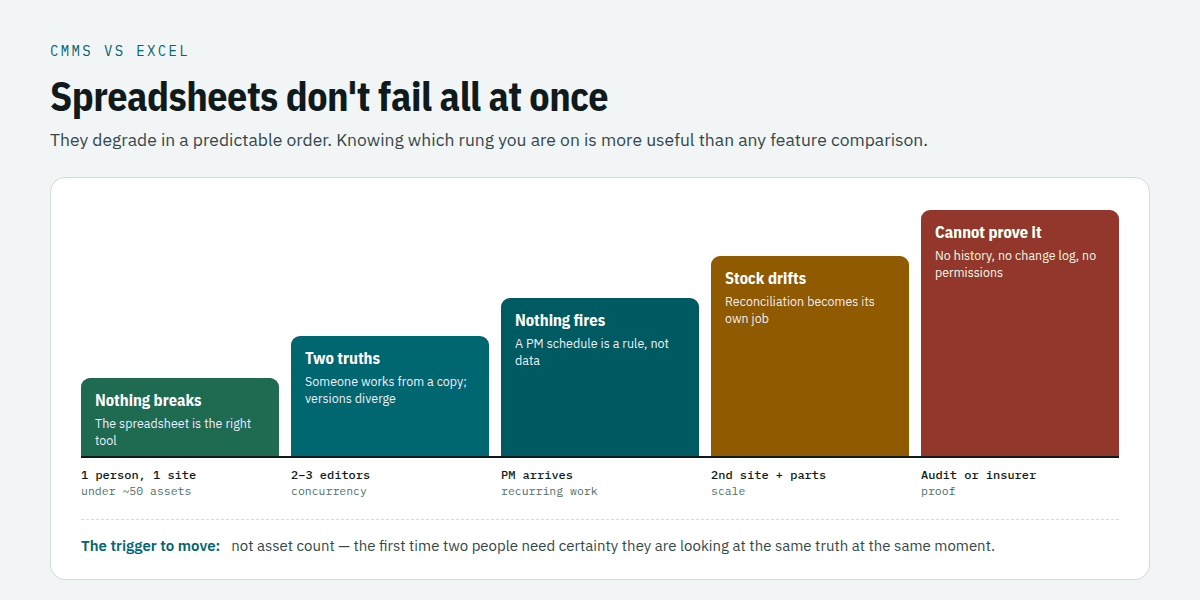
Spreadsheets do not fail all at once. They degrade in a fairly predictable sequence, and knowing where you are on it is more useful than any feature comparison.
The early failures
One person, one site, under about 50 assets. Nothing breaks. The spreadsheet is genuinely the right tool, and anybody telling you otherwise is selling something.
Two or three people editing. The first real failure, and it is concurrency. Microsoft’s documented limit is 256 people in a shared workbook, but the practical limit is closer to two, because the failure is not technical — it is that somebody has the file open, somebody else works from a copy, and the two versions quietly diverge. You now have two truths and no way to tell which is current.
Preventive maintenance enters the picture. Recurring work is where spreadsheets fall apart fastest, because a PM schedule is not data, it is a rule that has to fire. Excel cannot generate next month’s work by itself. Somebody does it manually, and the month they are on holiday is the month it does not happen.
The expensive failures
A second site. Now you have two files, or one file with a site column that nobody filters consistently. Reporting across both means reconciling by hand, and the reconciliation becomes a job in itself.
Parts and inventory. The point at which a spreadsheet becomes actively expensive. Stock levels in a file are a snapshot of the last time somebody counted, so you order things you have and run out of things the file says you hold.
Somebody asks a question about the past. “Was this contractor’s insurance valid on the 14th of March?” or “What did we spend on this pump last year?” A spreadsheet holds the current state, not the history of how it got there. Unless you kept dated copies, the honest answer is that you cannot reconstruct it.
An auditor, an insurer, or a lawyer. The end of the road. The question is no longer what you did but what you can demonstrate, and a file with no change log, no per-user permissions and no record of who edited what does not demonstrate anything.
CMMS vs Excel: when the spreadsheet is still the right answer
A CMMS vs Excel comparison that never concludes “keep the spreadsheet” is a sales page. Here is where we would genuinely tell you to stay put:
- One site, one maintenance person, fewer than about 50 assets. The overhead of any system will cost more than the disorder it removes.
- Mostly reactive work with almost no recurring PM. If nothing has to fire on a schedule, the biggest single advantage of a system does not apply to you.
- No compliance or audit obligation. Nobody external ever asks you to prove anything.
- The spreadsheet is genuinely current. If your file is accurate today and one person keeps it that way, that person is your system, and they are working. Replacing a working process with a worse one that happens to be software is a real and common way to go backwards.
The trigger for changing is not asset count. It is the first time two people need to be certain they are looking at the same truth at the same moment.
The migration trap
The CMMS vs Excel decision usually founders on something else entirely. The most common reason implementations disappoint has nothing to do with the software. It is that a bad spreadsheet becomes a bad database, faster and at greater expense.
Ready to make the move? Our spreadsheet to CMMS migration plan walks through it in eight steps, and our guide to preparing your asset spreadsheet for a CMMS import comes with a free Excel template.
If your asset list has duplicate entries, inconsistent naming, three spellings of the same building and a “notes” column carrying six kinds of information, importing it does not fix any of that. It preserves it, adds a licence fee, and removes the flexibility that made the mess survivable. People then blame the system.
The work that actually determines whether a move succeeds happens before any software is chosen: settle on one naming convention, deduplicate the asset list, decide what a “site” and a “location” mean and hold the line, and split multi-purpose columns into real fields. That work is genuinely tedious and it is the whole ballgame. If you do it and then decide to stay on Excel, you will still be better off than you were.
What to look for if you do move
Questions worth asking any vendor. These six separate real systems from spreadsheets with a login screen:
- Show me it refuse something. Ask to see the product decline an action it should not permit, and watch whether it explains itself in a sentence or throws a generic error.
- Which numbers on this screen are stored, and which are calculated? If the answer is “stored”, you have bought a spreadsheet with a login.
- What did this record look like six months ago? If there is no history, you have not solved the audit problem.
- Can the technician record work from where the work happens? On their own phone, without a laptop.
- What does it do when two people edit the same record? There should be a defined answer, not a shrug.
- What can I get back out? Full export, in a format you can read without the vendor. You already have this with Excel; do not give it up quietly.
Where Zenith fits, and where it doesn’t
We build a CMMS, so read this section as interested rather than neutral.
What we have deliberately built toward is the first two differences above. Rules live in one place, and the product enforces them at the point of action instead of describing them in a manual: a project will not close over open work and will name the jobs; a contractor whose paperwork has lapsed cannot be scheduled, and the refusal cites the document and the date. Figures on the screens are derived rather than stored, so progress, cost, urgency and forecast cannot drift out of date between someone typing them and someone reading them. You can read the specifics on the work order, asset management and contractor pages, each of which ends with a section naming what that module does not do.
That last habit is the important one. Every feature page on this site carries a “where this build stops” section listing the gaps in plain language, because the failure mode we care most about avoiding is the one where you discover a limitation in month four of an implementation rather than in week one of evaluation. If you are comparing us with anyone, ask them for the equivalent list and see what you get.
CMMS vs Excel: frequently asked questions
Can I run a CMMS in Excel?
You can run a maintenance record in Excel, and many organisations do it well. What you cannot build in a spreadsheet is the enforcement: a rule that fires on a schedule, a check that refuses an action, a figure that recalculates itself, or a history of who changed what. Excel stores; a CMMS decides. If your operation needs no decisions enforced, a spreadsheet is a legitimate answer.
At what point should we move off spreadsheets?
The most reliable trigger is not asset count but concurrency — the first time two or more people need certainty they are looking at the same current truth. Close behind it are the arrival of recurring preventive maintenance, a second site, and any external obligation to prove what you did. If none of those apply, staying put is defensible.
Is Excel really that error-prone?
The honest answer is that the widely quoted figures come from a small number of audits, most of them conducted before 2001, so treat the exact percentage with caution. The structural point does not depend on it: a spreadsheet cannot detect that a number is wrong, because it has no concept of what right would be.
What about Google Sheets, or Excel with Power Query?
They fix concurrency, which is the first failure on the list, and that is a real improvement. They do not add enforcement, history, scheduled generation of work, or a mobile record made at the point of work. You will get further before you hit the wall, and the wall is in the same place.
Will we lose the flexibility we have now?
Partly, and it is fair to say so. Adding a column in Excel takes seconds; adding a field in most systems does not. That is a genuine cost of moving, and the right question is whether the flexibility you use is worth the enforcement you lack. For a lot of teams the honest answer is that the flexibility is used once a year and the missing enforcement costs them monthly.
How do we avoid importing our existing mess?
Clean the data before choosing software, not after. One naming convention, no duplicates, agreed definitions for site and location, and multi-purpose columns split into real fields. This is the single largest determinant of whether an implementation succeeds, it is unglamorous, and no vendor can do it for you because it requires decisions only you can make.
If you want to see what the difference looks like on your own equipment rather than in the abstract, book a walkthrough — bring your actual spreadsheet, and we will go through which of the failures above you have already hit and which you have not.
The Canadian question a spreadsheet definitely cannot answer
Everything above applies anywhere. This part does not, and it is where a spreadsheet stops being merely awkward and becomes unusable.
Canadian maintenance records are governed provincially, not federally. So the same asset can carry different obligations depending on where it stands. An elevator in British Columbia must have its maintenance records viewable on site in both hard copy and electronic form, with one nominated as the primary record. The identical elevator in Ontario needs either format. A single spreadsheet template cannot hold both rules at once. See CMMS for Canadian property management.
Harder still, some retention rules are not periods but calculations. Under the reliability standard governing protection system maintenance, what you must keep depends on whether your maintenance interval is longer or shorter than your audit cycle — computed per activity. A spreadsheet can store that answer. It cannot produce it. See CMMS for Canadian utilities.
For the wider picture, see CMMS software in Canada.