
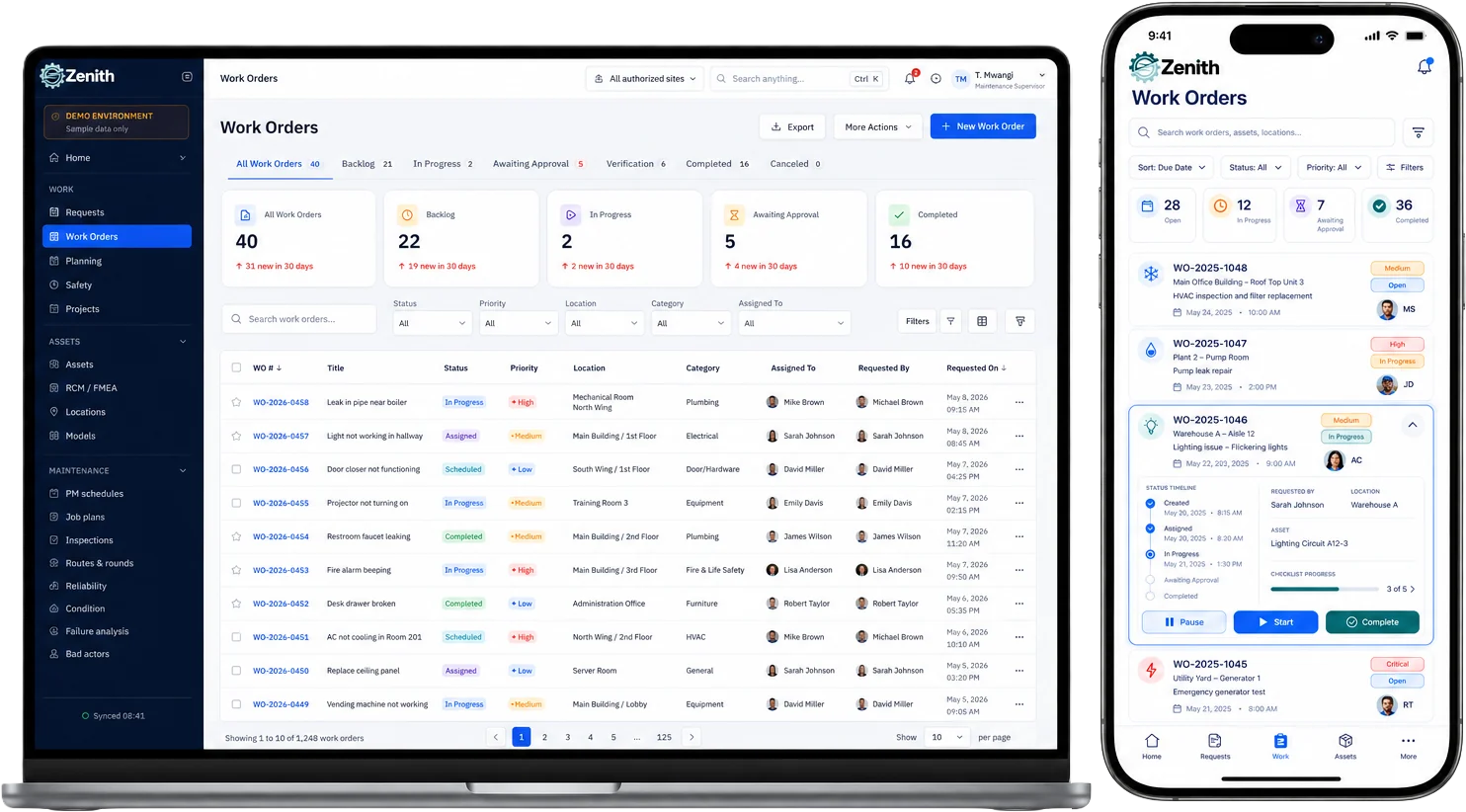


Managing maintenance across multiple sites requires a CMMS that centralizes dashboards, powers mobile updates—even offline—and automates preventive tasks. Zenith’s cloud-native platform unifies all your facilities in one interface, streamlines workflows, and prevents downtime to deliver consistent efficiency and cost control.
Why Multi-Site Operations Demand a Specialized CMMS
Managing a single facility is one thing. Coordinating maintenance, assets, and compliance across campuses or dozens of buildings multiplies complexity exponentially. A purpose-built CMMS streamlines that complexity by unifying data, standardizing processes, and reducing redundant effort.
Centralizing workflows yields faster decision-making and cost control. Consistent work-order procedures cut errors when technicians move between sites. Real-time visibility across your portfolio prevents small issues from ballooning into major downtime events.
Without a dedicated multi-site solution, siloed spreadsheets, email threads, and paper forms lead to miscommunication, missed maintenance windows, and inflated budgets. A modern CMMS resolves these pain points with scalable, cloud-based tools built for distributed operations.
Key Features to Look For
Selecting the right CMMS hinges on pinpointing functionality that supports diverse sites, technicians in the field, and corporate-level oversight. Here are the must-have capabilities:
Centralized Dashboards
- Unified view of all sites;
- Real-time KPIs and maintenance backlogs;
- Customizable widgets per user role;
- Drill-down from portfolio-level to individual asset.
Mobile Updates & Field Accessibility
- Native iOS/Android apps;
- Offline mode for no-signal environments;
- Barcode/QR code scanning for assets;
- Push notifications for urgent work orders.
Automation & Preventive Maintenance
- Rule-based scheduling by interval, meter reading, or calendar;
- Auto-generation of work orders;
- Email/SMS alerts for upcoming service;
- Conditional logic to defer or adjust tasks.
Asset Management
- Hierarchical asset tree across facilities;
- Configuration history and service logs;
- Parts inventory linked to assets;
- Warranty and contract tracking.
Work Order Management
- Multi-site assignment and routing;
- Priority-based SLAs and escalation paths;
- Digital sign-off and technician notes;
- Bulk work-order creation for recurring tasks.
Reporting & Analytics
- Cross-site cost and uptime comparisons;
- Trend analysis for failure patterns;
- Custom report builder with export options;
- Role-based access to dashboards and data.
User Permissions & Roles
- Granular role definitions (corporate, site manager, technician);
- Site-specific visibility controls;
- Audit trails for user actions;
- Single sign-on (SSO) integration.
Integration Capabilities
- Open APIs and webhooks;
- Prebuilt connectors (ERP, BI tools, BMS);
- Data import/export utilities;
- IoT sensor and BMS data feeds.
Scalability & Customization
- Tenant-aware architecture for multi-site data partitioning;
- Configurable workflows and forms;
- Multi-language and multi-currency support;
- Fast provisioning for new sites.
Security & Compliance
- Role-based access controls;
- Data encryption at rest and in transit;
- Compliance with ISO 9001, ISO 55000;
- Regular security audits and SOC 2 reporting.
Support & Training
- Onboarding assistance for large rollouts;
- Training resources (videos, documentation, live sessions);
- Dedicated customer success manager;
- 24/7 technical support option.
How Zenith Excels in Multi-Site Management
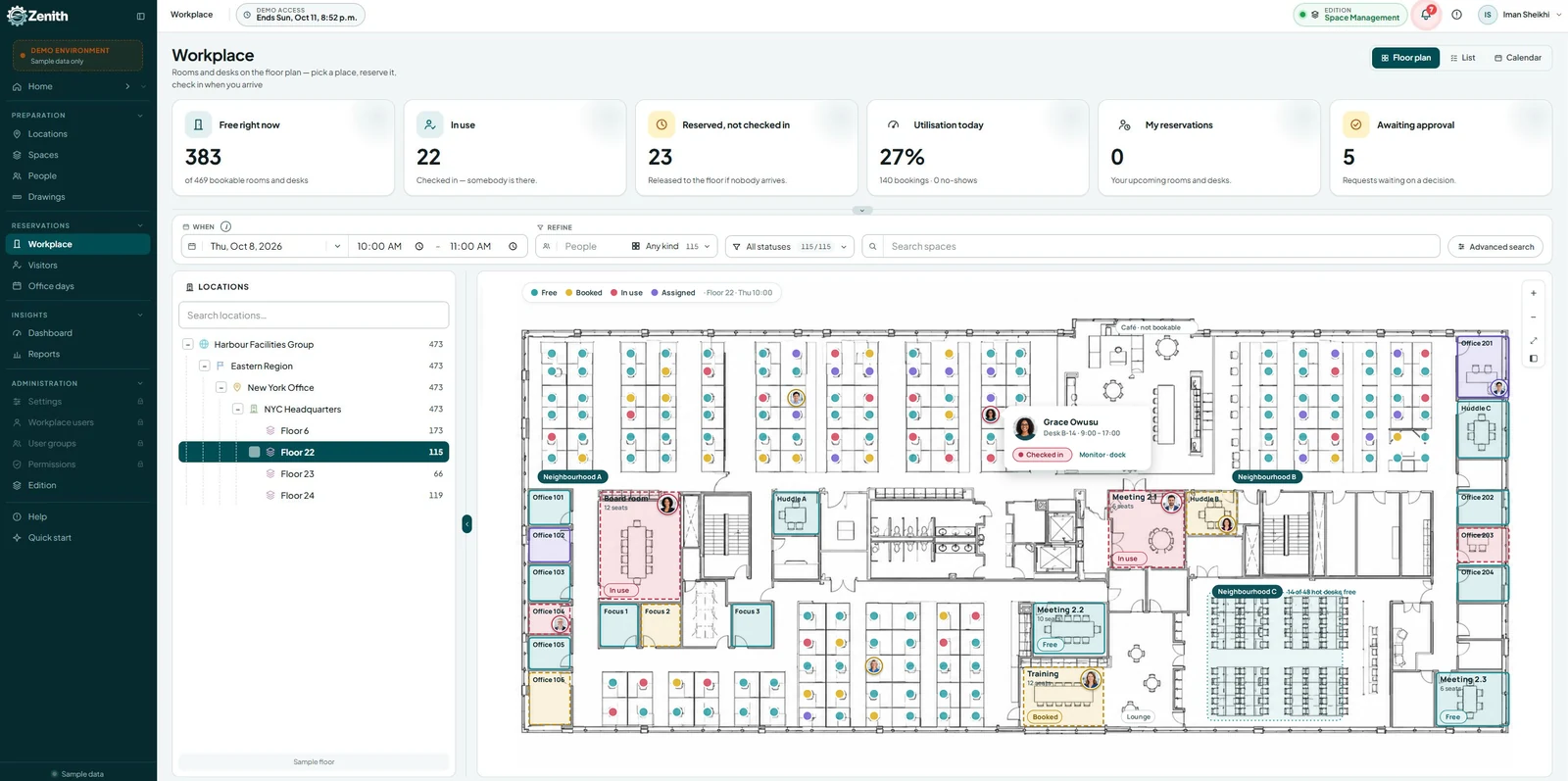
Managing maintenance across multiple sites requires a CMMS that centralizes dashboards, powers mobile updates—even offline—and automates preventive tasks. Zenith’s cloud-native platform unifies all your facilities in one interface, integrates CAFM drawings for a spatial, multi-site overview, and links assets directly to floor plans. This combination streamlines workflows, enhances visibility, and prevents downtime for consistent efficiency and cost control.
Zenith is architected from the ground up for organizations with distributed facilities. Here’s how it addresses each core requirement:
1. Centralized Dashboards Tailored for Portfolios
Zenith’s cloud console aggregates KPIs from every building or campus into a single pane of glass. Corporate managers see high-level metrics—open work orders, maintenance spend, compliance status—while site supervisors can drill down to diagnose delays or budget overruns in their specific facility.
2. Mobile-First Updates for Field Teams
The Zenith mobile app works offline and automatically syncs updates when connectivity returns. Technicians scan asset tags to pull up service history, capture photos of issues, and log labor and parts from the field. Instant push notifications alert them to urgent or high-priority work orders.
3. Automation Engine that Reduces Manual Overhead
With Zenith, you define maintenance plans by meter readings, run hours, or fixed intervals. The platform auto-generates preventive work orders, assigns them to technicians based on skill and availability, and routes approvals automatically. Conditional rules let you defer tasks if critical operations are underway.
4. Robust Asset Registry & Inventory Control
Zenith organizes assets into hierarchical trees—campus > building > floor > equipment. Each record tracks service history, parts used, and warranty details. Parts inventory is linked to assets, with reorder thresholds and supplier catalogs built in, so you avoid stockouts or over-ordering.
5. Optimized Work Order Lifecycle
From request submission to closure, Zenith standardizes work-order flow. Users at any site submit requests via web, mobile, or email. Work orders auto-route to the right supervisor for approval, then to a qualified technician. Digital sign-off and time-tracking ensure SLA compliance and accurate cost allocation.
6. Advanced Reporting & Analytics
Zenith’s report builder lets you compare maintenance costs per square foot across locations, analyze mean time between failures (MTBF), and forecast budget needs. Dashboards update in real time, and scheduled reports deliver insights to stakeholders automatically.
7. Flexible Roles & Permission Sets
Define roles once and apply them across all sites. Whether you need regional managers to oversee multiple facilities or subcontractors to handle only certain buildings, Zenith’s permission engine guarantees the right level of visibility and control.
8. Seamless Integrations
Zenith offers RESTful APIs and prebuilt connectors for leading ERPs, BI tools, and building management systems. Tie sensor data from your IoT network directly into asset records, or push maintenance spend into your financial system—all without manual data entry.
9. Scalable, Secure Multi-Tenant Architecture
New sites can be provisioned in minutes, inheriting your corporate configuration or customized individually. Zenith encrypts data at rest and in transit, undergoes regular third-party security audits, and helps you maintain regulatory compliance across locations.
10. Dedicated Support & Training
Zenith assigns you a customer success manager for your rollout. Onboarding includes data migration services, live training sessions for administrators and technicians, and access to an extensive knowledge base. You can opt for 24/7 support to ensure facilities never go unmonitored.
How to Evaluate CMMS Options Practically
- Map Your Site Topology and Workflows First
- Document number of sites, typical work types, technician locations, and vendor footprint.
- Define what must be standardized and what must remain flexible.
- Build a Feature Checklist Aligned to Business Outcomes
- Group requirements next to outcomes such as reduce downtime, reduce parts spend, or demonstrate compliance.
- Score vendors not just on features but on how they achieve outcomes.
- Prioritize Mobile and Offline Functionality
- Ask for live demos showing field workflows, photo capture, and offline sync recovery scenarios.
- Validate Data Model and Onboarding Process
- Request a sample asset import and see how the system handles duplicates, hierarchies, and bulk edits.
- Evaluate migration support and tools for cleaning legacy data.
- Test Multi-Site Reporting and Dashboards
- Require sandbox access to run sample portfolio-level reports and drill into site-level data.
- Assess Workflow Automation and Rule Engines
- Build a few representative automations during the proof of concept to validate configuration ease.
- Check Integration Depth
- Confirm connectors for ERP, HR, and BMS or verify API maturity for building custom integrations.
- Consider Total Cost of Ownership
- Total license or subscription costs; fees for mobile users; implementation and professional services; integration and ongoing support costs.
- Validate Security and Compliance Posture
- Review SOC or ISO certifications, encryption at rest/in transit, role-based access logs, and data retention controls.
- Talk to Reference Customers with Similar Scale and Complexity
- Ask how the supplier handled rollout across multiple sites and delivered measurable outcomes.
A disciplined evaluation process reduces surprises during rollout and ensures the chosen CMMS delivers measurable benefits.
Implementation Best Practices for Multi-Site Rollouts
- Start with a Pilot Site or Site Cluster
- Choose representative sites that include complexity you expect to scale.
- Use the pilot to refine data models, default templates, and training materials.
- Standardize but Permit Local Variation
- Create a core template for assets, PMs, and work orders, then allow site-level overrides where necessary.
- Central Governance and Local Champions
- Establish a central CMMS governance team to maintain standards, run analytics, and manage integrations.
- Appoint site champions who receive deeper training and help with adoption locally.
- Clean Data Before Migration
- Consolidate asset lists, remove duplicates, standardize naming conventions, and enrich records with manuals and photos.
- Train in Context of Daily Work
- Field technicians learn best by doing. Use real work orders, real assets, and mobile scenarios in training.
- Roll Out Features in Phases
- Launch core work order and PM features first, then introduce inventory optimization, vendor modules, and predictive maintenance.
- Measure Success and Iterate
- Track adoption metrics, PM completion rates, deferred work, response times, and parts spend.
- Use feedback loops to refine templates, automations, and dashboards.
- Use Integrations to Reduce Duplicate Effort
- Sync user directories, asset master data, and financial records to avoid rekeying and errors.
- Prioritize Offline Reliability and Sync Integrity
- Ensure mobile workflows tolerate inconsistent connectivity and provide clear conflict resolution.
- Plan for Long Term Continuous Improvement
- Treat CMMS adoption as an ongoing program not a one-time project. Regularly revisit KPIs and optimize.
Following these practices avoids the typical pitfalls of fragmented adoption and inconsistent data quality.
Practical Example Use Cases
- Consolidated Preventive Maintenance Across a University Campus
- Create PM templates for HVAC units applied across multiple buildings; bulk schedule seasonal PMs and track completion rates by building and department.
- Shared Spare Parts Pool for Retail Chain
- Maintain a central SKU catalog with recommended minimums; trigger inter-store transfers before creating costly expedited purchases.
- Emergency Response for Distributed Facilities
- Use portfolio dashboard to triage incidents by severity and site impact; automatically assign response teams based on location and skill set.
- Vendor Performance Management for Healthcare Network
- Track vendor SLA compliance and tie outcomes to patient-facing uptime KPIs; identify underperforming vendors to renegotiate contracts or reassign work.
Each example shows how centralized control plus local responsiveness delivers measurable operational improvements.
Typical Business Outcomes from a Well Implemented Multi-Site CMMS
- Reduced downtime from coordinated preventive maintenance and faster response times.
- Lower parts and procurement costs through cross-site inventory optimization.
- Improved technician productivity from better scheduling and mobile workflows.
- Stronger compliance posture with searchable, centralized audit trails.
- Lower operating expenses by consolidating vendors and standardizing processes.
- Scalable operations that can absorb new sites quickly with minimal incremental overhead.
Outcomes depend on disciplined change management and the CMMS’s ability to scale with your operations.
Measuring Success After Deployment
- Adoption Metrics
- Mobile usage rates by technician; percentage of work orders created and closed in the CMMS.
- Reliability Metrics
- PM completion rate; emergency versus planned maintenance ratio; MTTR and mean time between failures MTBF.
- Financial Metrics
- Parts spend by site; overtime costs; cost per work order; total maintenance spend as a percentage of replacement asset value.
- Efficiency Metrics
- Technician utilization and travel time; work order cycle time and backlog trends.
- Compliance Metrics
- Audit pass rates; time to produce documentation for inspections; percentage of assets with up-to-date certifications.
Set baseline measurements before rollout and track improvements quarter over quarter to quantify ROI.
Spatially Smart Maintenance: Leveraging Drawings and Floor Plans Across Sites
In multi-site facility management, seeing is managing. When your CMMS integrates with CAFM (Computer-Aided Facility Management) tools, it unlocks a spatial layer of intelligence that transforms how you oversee assets, workflows, and space utilization across buildings and campuses.
Zenith stands out by combining powerful CMMS functionality with dynamic floor plan visualization, giving facility managers a real-time, interactive map of every site—whether it’s a single building or a sprawling network of campuses.
Key Advantages of Spatial Integration for Multi-Site Operations
1. Unified Visual Overview
- View multiple facilities side by side in a single interface
- Navigate between campuses, buildings, and floors with intuitive map controls
- Instantly locate assets, rooms, and service zones across sites
2. Asset-to-Location Linking
- Every asset is tied to its exact position on a floor plan
- Technicians can visually identify equipment before arriving
- Reduces search time and improves first-time fix rates
3. Interactive Work Order Management
- Clickable drawings allow users to create or view work orders directly from the map
- Color-coded indicators show open, in-progress, and completed tasks
- Enables spatial prioritization—e.g., clustering tasks by zone or floor
4. Space Utilization Insights
- Track occupancy, usage patterns, and maintenance hotspots
- Identify underused or high-traffic areas for strategic planning
- Support energy audits and sustainability initiatives with spatial data overlays
5. Cross-Site Standardization
- Apply consistent drawing templates and asset tagging across all locations
- Maintain uniform naming conventions and visual standards
- Simplifies onboarding for new sites and staff
6. Emergency Response & Compliance
- Floor plans highlight fire exits, safety equipment, and restricted zones
- Supports compliance audits with spatial documentation
- Enhances emergency planning and real-time incident response
7. Mobile-Friendly Navigation
- Technicians access floor plans on mobile devices in the field
- Pinch-to-zoom and tap-to-locate features streamline on-site work
- Offline access ensures usability even in low-connectivity areas
How Zenith Makes It Seamless
Zenith’s CAFM integration isn’t just a visual add-on—it’s a core part of the platform. You can:
- Upload and manage CAD drawings or interactive PDFs
- Link assets, rooms, and zones to live data feeds
- Filter drawings by site, building, floor, or asset type
- Use drawing overlays to visualize HVAC systems, electrical grids, or plumbing networks
- Customize layers to show maintenance zones, technician routes, or compliance markers
Whether you’re managing a university campus, a healthcare network, or a retail chain, spatial intelligence helps you move from reactive maintenance to proactive strategy. With Zenith, your buildings aren’t just dots on a dashboard—they’re living maps of operational insight.
Data Management & Security: The Backbone of Multi-Site Facility Operations
In multi-site facility management, data isn’t just valuable—it’s mission-critical. From asset histories and maintenance schedules to compliance records and technician credentials, every site generates a stream of sensitive information. Without proper controls, this data can become fragmented, exposed, or misused, leading to operational inefficiencies and serious security risks.
Centralized systems must balance accessibility with protection. Facility managers need to ensure that users only see what’s relevant to their role and location, while still maintaining enterprise-wide oversight. That’s where Zenith excels.
How Zenith Simplifies Secure Data Management
Zenith offers a robust, role-based permission engine that lets you assign functional groups to specific sites and control access to data with just a few clicks. Whether you’re managing a national portfolio or a handful of campuses, you can:
- Create User Groups by Function or Role
Define roles like “Site Technician,” “Regional Manager,” or “Corporate Admin,” each with tailored access rights. - Assign Groups to Specific Sites
Limit visibility so users only interact with the buildings, assets, and work orders relevant to their location. - Control Access to Sensitive Information
Restrict who can view financials, compliance documents, or strategic reports—ensuring data privacy and governance. - Audit User Activity
Track who accessed what, when, and from where. This supports internal audits and regulatory compliance. - Enable Single Sign-On (SSO)
Integrate with enterprise identity providers for secure, seamless login across teams. - Set Permissions in Seconds
The intuitive admin console allows you to configure or update user access instantly—no coding, no delays.
Real-World Impact
Imagine a technician in Vancouver who only needs access to HVAC assets in one building, while a regional manager in Toronto oversees five campuses. With Zenith, you can grant each user the exact level of access they need—no more, no less. This minimizes errors, protects sensitive data, and ensures that every team member works within a secure, streamlined environment.
Implementing Zenith in Your Organization
- Conduct a Needs Assessment
- Identify sites, asset types, and current pain points.
- Map existing workflows and compliance requirements.
- Configure Core Settings
- Set up your organizational hierarchy and user roles.
- Import asset and inventory data via CSV or API.
- Define Preventive Maintenance Plans
- Apply interval, meter-based, and conditional scheduling rules.
- Assign default technician groups or subcontractors.
- Train Your Teams
- Host live webinars for admins and site supervisors.
- Offer hands-on mobile app workshops for field staff.
- Pilot in a Subset of Sites
- Validate workflows and data accuracy.
- Gather feedback and adjust configurations.
- Roll Out Full Deployment
- Provision remaining sites in the cloud console.
- Monitor adoption metrics and resolve any issues.
- Optimize Continuously
- Review KPIs monthly—MTTR, preventive compliance, cost variances.
- Refine schedules, roles, and reports based on insights.
Final recommendations for a multi-site rollout
- Treat the CMMS as an operational backbone not a niche tool. Success requires data hygiene, governance, and ongoing process improvement.
- Prioritize mobile, offline-first workflows and a centralized dashboard for portfolio visibility.
- Standardize templates and automations but preserve local flexibility for site-specific rules.
- Leverage integrations to reduce duplication across finance, HR, and building systems.
- Choose a partner that understands multi-site complexity and offers implementation services and roadmap alignment.
Zenith is positioned to be that partner by delivering centralized visibility, mobile field tools, inventory optimization, and automation tailored for multi-site facility portfolios. With the right strategy and governance, deploying a capable CMMS transforms fragmented maintenance operations into a predictable, efficient, and auditable function that scales with your organization.
References:
quality/compliance standards information.
workplace safety guidance relevant to facilities.
research/vendor evaluation resources (link to relevant Gartner CMMS or facilities reports).
examples of BMS integrations and vendor pages.
IoT and predictive maintenance context.
Frequently Asked Questions
1. What exactly is a CMMS and why do I need one for multiple sites?
A CMMS is a Computerized Maintenance Management System. For multi-site operations, it centralizes maintenance data, standardizes processes, and delivers portfolio-level visibility that spreadsheets and email can’t match.
2. How does a centralized dashboard benefit multi-site operations?
It aggregates KPIs—open work orders, downtime, maintenance costs—from all locations into one view. You spot trends, compare performance, and make data-driven decisions quickly.
3. Can Zenith work without constant internet access?
Yes. The mobile app functions in offline mode, caching work orders and asset data locally. Once the device reconnects, updates sync automatically with the cloud.
4. How does automation reduce maintenance costs?
By auto-generating preventive tasks at optimal intervals, you minimize unplanned repairs and extend asset life. Rule-based escalation prevents missed approvals or overdue work orders.
5. Will Zenith integrate with our existing ERP and BMS?
Zenith offers RESTful APIs and prebuilt connectors for major ERPs and building management systems. You can also map data fields for one-time or ongoing integrations.
6. How easy is it to add new buildings or campuses later?
New sites can be provisioned in minutes. You replicate your corporate configuration or customize settings per location. There’s no need for separate installations.
7. What kind of reporting does Zenith provide?
You get cross-site dashboards, customizable KPI widgets, trend charts, and an ad-hoc report builder. Scheduled reports can be emailed to stakeholders automatically.
8. How granular are the user permissions?
Roles can be defined at any level—enterprise, region, site, or individual asset. You control read/write access, approval rights, and data visibility per user or group.
9. What security standards does Zenith meet?
Zenith uses AES-256 encryption at rest, TLS 1.2+ in transit, and undergoes regular SOC 2 audits. Role-based access and SSO support ensure robust governance.
10. What kind of training and support is included?
Onboarding covers data migration, configuration, and live training for admins and technicians. You also get access to video tutorials, user guides, and a dedicated customer success manager, with optional 24/7 technical support.
- How does Zenith model multi-level location and asset hierarchies?
Zenith uses a flexible, multi-tier location model that represents portfolios as Portfolios > Campuses > Buildings > Wings > Floors > Rooms, with assets linked to any level. Asset templates and type definitions enforce consistent data fields across identical equipment, and versioned asset records store history, manuals, warranty details, and vendor contacts. The system supports parent-child asset relationships, bulk tagging, and search/filtering by location, tag, or custom attribute. - Can the mobile app operate fully offline and what data sync strategies exist?
Zenith’s mobile app supports full offline operation for receiving, updating, and closing work orders, capturing photos, and completing checklists. Local device storage queues changes and attachments for automatic background sync when connectivity returns. Sync strategies include incremental delta sync for minimal bandwidth, conflict detection with last-write-wins and configurable merge rules, and prioritized sync for critical records such as safety incidents or compliance sign-offs. - What automation rules and predictive maintenance integrations are available out of the box?
Out-of-the-box automation includes scheduled calendar and meter-based PM generation, rule-based auto-assignment, SLA escalation, conditional task creation, and auto-generation of purchase orders from failed checks. Predictive maintenance integrations include connectors for common IoT and condition-monitoring platforms, threshold-based alerting that converts sensor events into work orders, and pattern-based analytics that surface high-risk assets for proactive inspection. - How does Zenith handle inter-site inventory transfers and consolidated reorder suggestions?
Inventory is managed as a centralized catalog with per-site stock levels and configurable minimums. The system recommends inter-site transfers when a site dips below threshold and another site has surplus, generates transfer orders, and updates on-hand quantities upon receipt. Consolidated reorder suggestions use usage history, lead times, and vendor constraints to create optimized purchase recommendations at portfolio or site level. - What integration connectors exist for ERP, procurement, HR, and BMS systems?
Zenith provides prebuilt connectors and REST APIs for common ERPs, procurement systems, HR directories, and building management systems. Typical integrations include user directory sync for authentication and roles, GL and cost-center sync for financial allocation, purchase order and invoice reconciliation with procurement systems, and telemetry ingest from BMS and IoT platforms for automated condition-based work generation. - How are role based permissions and delegated administration configured across sites?
Role-based access control is fine-grained and hierarchical. Administrators define roles and permissions at portfolio, site, or module level. Delegated administration lets central admins assign site managers rights to manage local users, work orders, and inventories while preserving portfolio-level configuration and audit controls. Permission scopes support read-only, edit, approve, and admin actions and can be applied to groups or individual users. - What reporting and dashboard customization capabilities exist for portfolio-level KPIs?
Zenith includes a centralized dashboard builder with portfolio-level KPI widgets and drill-down capability to site and asset views. Users can create custom dashboards, schedule automated reports, export data, and connect to external BI tools via API or data export. Standard KPIs include backlog, MTTR, PM completion rate, spend by site, and vendor performance, all filterable by site, asset class, date range, and other attributes. - What professional services and implementation support does Zenith provide for multi-site rollouts?
Zenith offers implementation services including discovery and site topology mapping, data migration and cleansing, asset and PM template configuration, pilot deployment, training for central and site teams, and rollout project management. Ongoing options include managed services, integration engineering, and optimization engagements to refine automations and reporting post-deployment. - Can you provide case studies or references from organizations managing similar site counts and complexity?
Zenith can provide case studies and customer references that match your industry and site complexity on request. Case studies typically document rollout approach, measured outcomes such as reduced downtime and inventory savings, and lessons learned from multi-site implementations.
These questions reveal how well the platform will fit your operational reality and scaling plans.
Next Steps and Additional Resources
- Schedule a personalized Zenith demo to see multi-site features in action.
- Explore trends in IoT-driven predictive maintenance to stay ahead of failures.
- Review case studies from educational campuses, healthcare networks, and manufacturing parks that scaled with Zenith.
If you’re ready to transform your multi-site facility management, Zenith’s centralized dashboards, mobile updates, and automation engine provide the backbone you need. Reach out today to start your free trial and streamline maintenance across every building you manage.
CMMS for Multi-Site Facility Management in Canada means multi-regulator
Multi-site is hard everywhere. In Canada it is hard for an extra reason: your sites may not answer to the same rules.
Maintenance records here are provincial rather than federal, so a portfolio spanning provinces spans regimes. The same elevator model needs its records in both hard copy and electronic form in British Columbia, but either format in Ontario. The same refrigeration rack has a testing interval set by regulation in Quebec and by your own policy in Ontario. The same relay can be governed by different versions of the same standard, in force on different dates, in Manitoba, Alberta and Quebec.
That is why per-site rules matter more than reporting templates. One register, one set of numbers for the executive team, but obligations that differ by location. We work through the detail in property management, retail and utilities.
For the overview, see CMMS software in Canada.