



Most teams that set out to choose a CMMS start with a feature list. Many end up paying for modules nobody opens. The better question is narrower: what does your work actually look like, and what does your regulator or your board expect you to prove? Answer those two, and the right level of CMMS usually picks itself.
This guide gives you a simple way to size a CMMS and explains what each level adds. It then walks through common Canadian industries: what they need, what they can skip, and which Zenith edition tends to fit.
Five questions to ask before you choose a CMMS
Before you compare products, write down honest answers to these five questions. They matter more than any demo.
- Who reports problems, and who fixes them? If hundreds of staff report and five people fix, you need easy requesting more than deep planning.
- How much of your work is planned? If most jobs are reactive, start with requests and work orders. If inspections and servicing fill the calendar, you need preventive maintenance.
- Do parts sit on shelves? A storeroom with stock you have to count needs inventory. A team that buys parts as needed may not.
- Who else works on your sites? Contractors, permits and hazardous work push you toward vendor records and safety controls.
- What do you have to prove, and to whom? An inspector, an auditor or a council asking for lifecycle costs needs a different kind of record than a manager asking what got fixed last week.
Two practical points save money at this stage. Count only the people who do the work, because in Zenith requesters, view-only users and contractors are free on every edition. And remember you can move up or down later: a lower edition hides features, it never deletes your records.
The four levels to weigh when you choose a CMMS
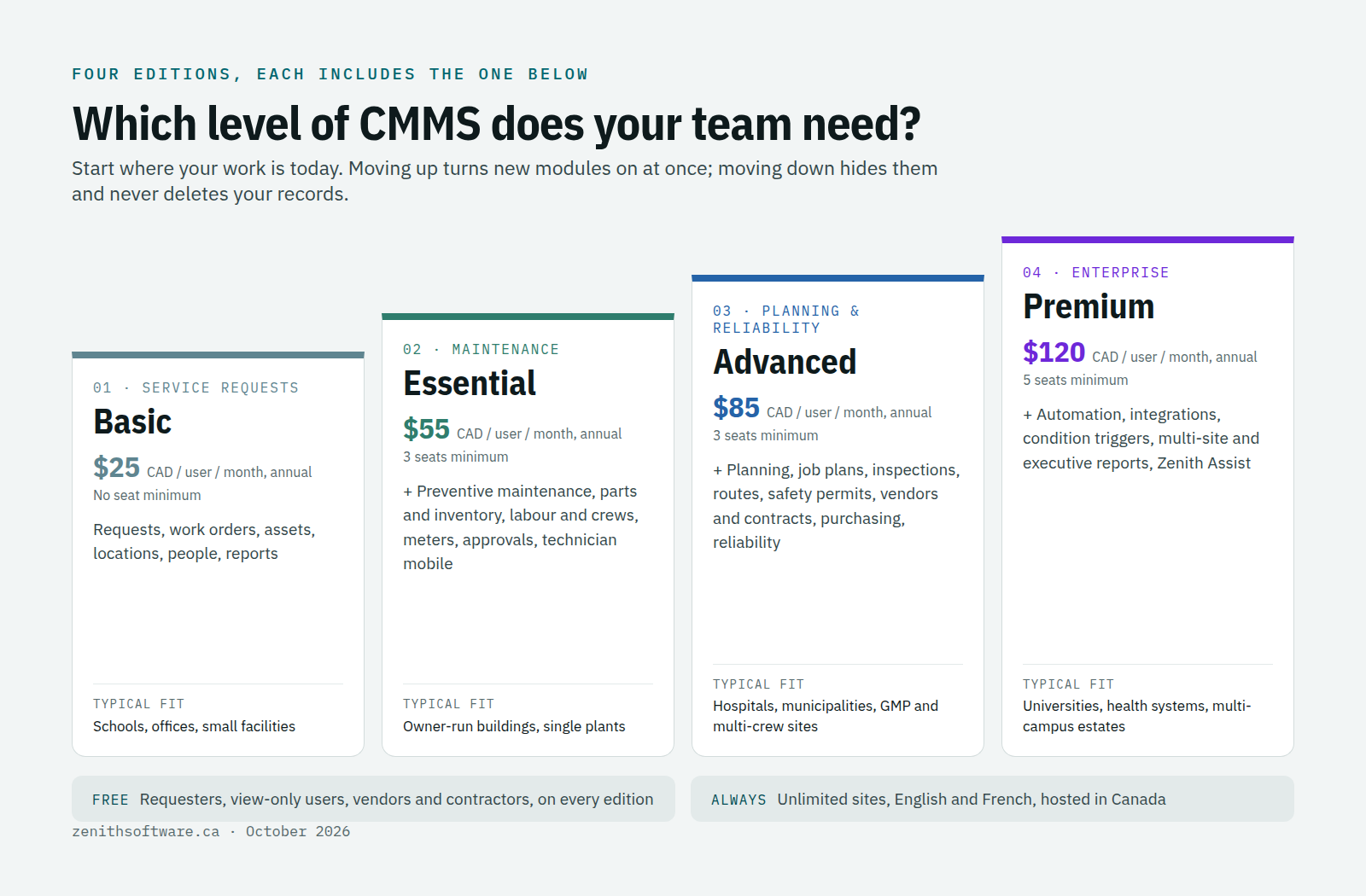
Almost every CMMS on the market follows the same ladder, whatever the vendor calls the steps. Zenith names them plainly, and each edition includes everything below it.
Basic: get problems reported and fixed
Service requests, work orders, an asset register, locations, people and reports. This is the level for a school, an office or a small facility that mainly needs to stop losing requests in email and know who fixed what. It works in English and French, with unlimited sites and requesters. Basic starts at $25 CAD per user per month on annual billing, with no seat minimum.
Essential: run a real maintenance team
Essential adds preventive maintenance on daily, weekly, monthly, yearly and nth-weekday patterns. It brings parts and inventory, labour, crews, tools and meters. Work flows through a triage desk, approvals and verification, with a backlog view, a work order calendar and technician mobile pages. If you have recurring servicing and a storeroom, this is usually the right floor. It starts at $55 CAD per user per month on annual billing, with a three-seat minimum.
Advanced: plan the work and manage the risk
Advanced is for mature teams with several crews. It adds planning and scheduling, job plans, inspections, and routes and rounds. Safety permits and hazards control risky work. Vendors and contracts keep each vendor’s work history, next to purchasing and projects. Reliability tools, PM triggers that combine time and meter readings, and a PM cost forecast round it out. It starts at $85 CAD per user per month on annual billing.
Premium: run many sites as one estate
Premium is for universities, health systems and multi-campus estates. It adds automation and workflows, integrations with your other systems, and condition and event triggers. Leaders get PM effectiveness analysis, executive and multi-site reports, and a custom report builder. Zenith Assist cites its sources and asks before it acts. It starts at $120 CAD per user per month on annual billing, with volume pricing from 25 seats. Full details are on the pricing page.
How to choose a CMMS edition for your industry
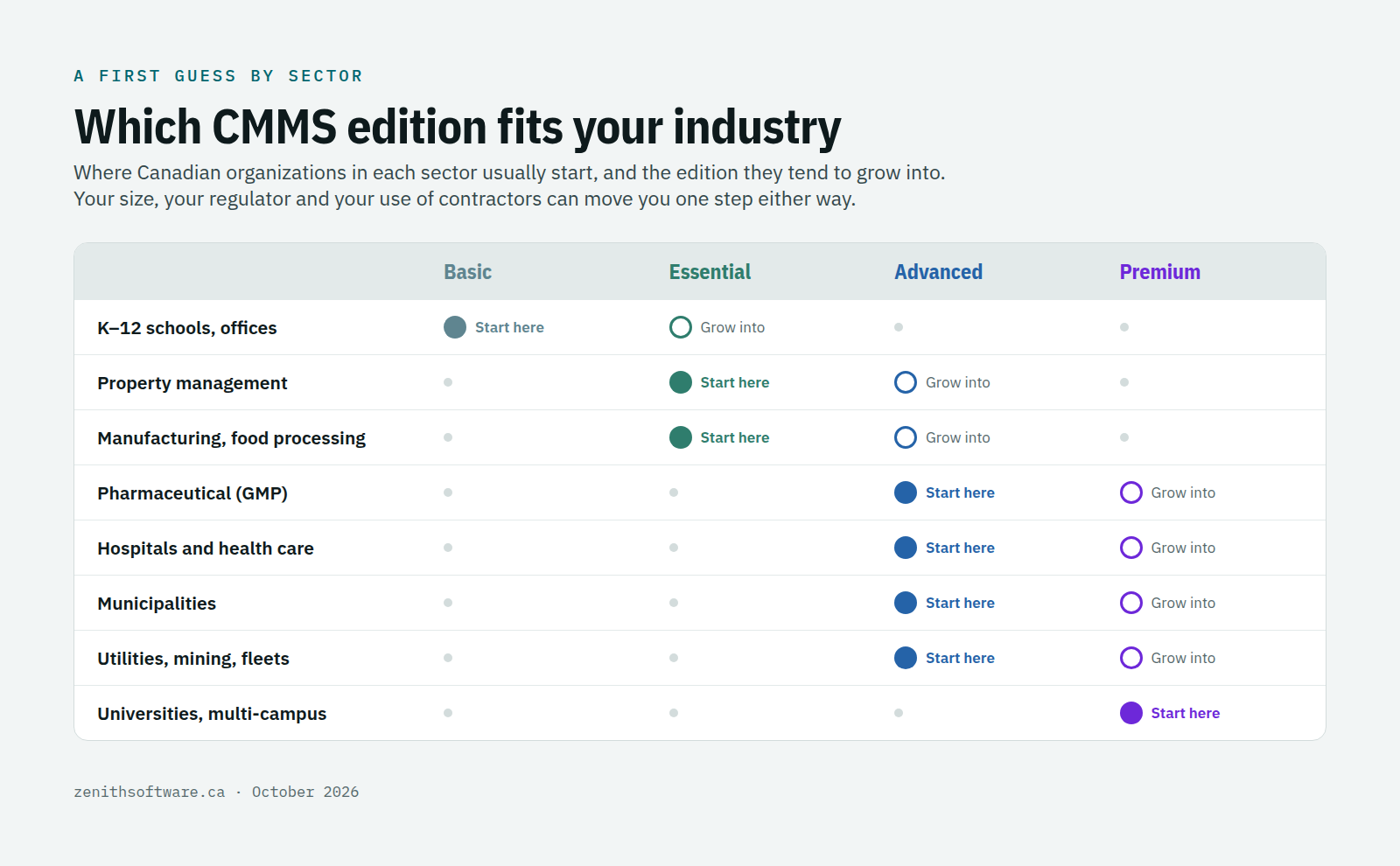
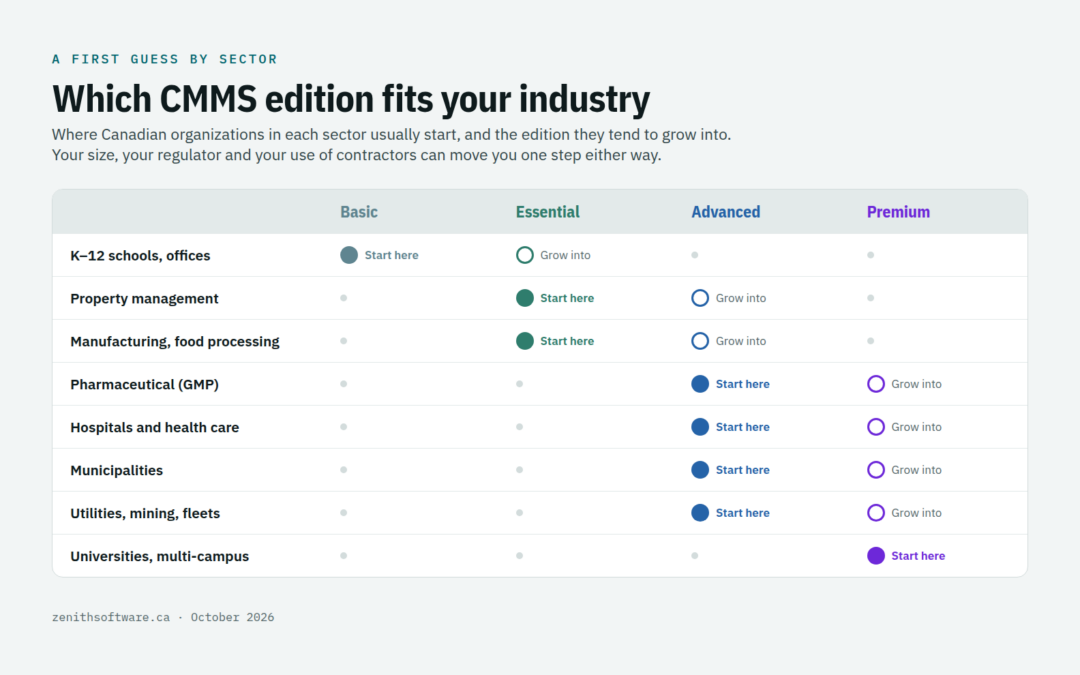
Industry is a good first guess, because each sector in Canada answers to different standards. Here is what each one typically needs, what it can safely skip, and where Zenith customers in that sector tend to land.
K–12 schools, offices and small facilities
What they need: a simple way for teachers and staff to report problems, a clear queue for a small team, and an asset list for boilers, rooftop units and portables. What they can skip: purchasing, reliability analysis and planning boards. Where they land: Basic, moving to Essential once preventive maintenance on heating and life-safety equipment needs to run on schedule. Because requesters are free, a school board can open requesting to every staff member without adding cost.
Property management and commercial buildings
What they need: PM for HVAC, elevators and fire systems, and records that hold up when an inspector asks. Elevators are a good example. Under CSA B44, as adopted in British Columbia, each unit needs a maintenance control program with task, interval and completion records on site. Fire alarm systems need an annual inspection to CAN/ULC-S536 under the National Fire Code, with device-level records. What they can skip: routes and rounds, and reliability tools. Where they land: Essential for owner-operated buildings; Advanced when contractors do most of the work, because vendor history and contracts become the record you rely on.
Manufacturing and food processing
What they need: PM driven by run hours as well as the calendar, a storeroom, and safe isolation of equipment before work starts. Food plants also answer to the Safe Food for Canadians Regulations, which expect equipment and facilities to be maintained, kept in good repair and to function as intended. What they can skip: at first, automation and integrations. Where they land: Essential for a single plant with a small crew; Advanced once job plans, safety permits, purchasing and reliability analysis matter.
Pharmaceutical and other GMP sites
What they need: Health Canada’s GMP guide GUI-0001 expects equipment used for significant processing or testing to follow a written preventive maintenance program. It also expects maintenance and calibration records, and a unique identifier for each piece of equipment. What they can skip: very little. Where they land: Advanced, for job plans, inspections and verification on every critical task. Your quality team still owns validation of any system used for GMP records.
Hospitals and health care
What they need: CSA Z8002, the standard for operation and maintenance of health care facilities, describes a coordinated operation and maintenance program. Every element that needs care is identified and supported by a documented system. In practice that means full PM on medical gas, HVAC and life-safety systems. It also means permits for work in occupied areas and reports leadership can read. What they can skip: nothing in the core. Where they land: Advanced for a single hospital or a group of clinics; Premium for health authorities and multi-site systems that need integrations and multi-site reporting.
Municipalities
What they need: in Ontario, O. Reg. 588/17 has required asset management plans covering all municipal infrastructure since July 2024. Since July 2025, those plans must also set proposed levels of service, with the lifecycle activities and costs to deliver them. Other provinces are moving the same way. That puts a premium on asset condition, work history and a forecast of PM cost. What they can skip: at first, automation. Where they land: Advanced, for projects, purchasing and PM cost forecasting; Premium for larger cities that want to connect maintenance to finance and other systems.
Utilities, mining and fleets
What they need: inspection rounds across remote sites, PM triggered by meter readings as well as dates, and strict permit-to-work controls. What they can skip: little beyond the workplace modules. Where they land: Advanced, for routes and rounds, hybrid PM triggers, fleet scope and safety permits; Premium when condition data from sensors or other systems should open work by itself.
Universities and multi-campus estates
What they need: one system across dozens of buildings and several trades, consistent reporting for leadership, and connections to finance, space and identity systems. Where they land: Premium. Zenith includes unlimited sites and buildings on every edition, so the price follows the size of your team, not the size of your estate.
Common mistakes when you choose a CMMS edition
- Buying for the team you hope to have. Start at the level you will use in the first six months. Moving up later takes minutes, and nothing you entered is lost.
- Counting requesters as users. Only technicians, planners, supervisors and administrators need a paid seat in Zenith.
- Ignoring your inspector. If an elevator inspector, a food inspector or a quality auditor reads your records, choose the edition that produces the records they expect, not the one with the nicest dashboard.
- Splitting systems by department. Two cheap tools for two teams usually cost more than one shared system once you count the double entry.
How Zenith helps you choose a CMMS edition
You do not have to work this out alone. Tell us your sites, team size and the standards you answer to. We will recommend an edition and show you your own assets running in it. A free two-week trial runs on your own data, and our team can import your existing records for you. If you are moving from another system, our guide to switching CMMS software in Canada explains how the move works.
Every edition is hosted in Canada, works in English and French throughout, and is priced in Canadian dollars. Move up when the work grows, move down if it shrinks, and your history stays exactly where it is.
Questions people ask when they choose a CMMS
Can we mix editions for different teams?
One organization runs on one edition, so everyone shares the same records. Because requesters and contractors are free, most organizations find the bill depends on a handful of technician seats rather than on headcount.
What if we choose a CMMS edition that turns out wrong?
Change it. Moving up turns on the new modules immediately. Moving down hides what the lower edition does not include, and it comes back the moment you move up again.
Is a CMMS different from an EAM?
The line is blurry. A CMMS manages maintenance work; an enterprise asset management system adds the full asset lifecycle, purchasing, contracts and reliability. In Zenith, Advanced and Premium cover most of what buyers mean by EAM. Our CMMS vs Excel article covers the step before all of this.
Where to start
Write down your answers to the five questions, then talk to us or start a free trial from the pricing page. Bring one real work order and one inspection you dread. We will show you which edition handles both, and which features you can leave switched off.
Published by Zenith Software Corp., Victoria, British Columbia · October 2026. Practical guidance, not legal or regulatory advice — confirm the standards that apply to your sites with your regulator, inspector or quality team. We verified the external references in October 2026.