



Maintenance departments in school districts, universities, hospitals, government buildings, and commercial office buildings nationwide increasingly rely on a computerized maintenance management system (CMMS) to gather, sort, analyze, and report on essential information related to equipment and facilities performance. Managers use this information, among other things, to set department priorities and cost-justify equipment purchases. In many cases, the CMMS is not producing the desired results. The question is, when is the time to audit your CMMS to see if you need to upgrade it?
Let us understand the meaning of optimization and upgrading of a CMMS. Optimization means determining existing useful features in your CMMS that are currently not being used and starting to utilize them to improve productivity. Upgrading means determining the lack of useful features in your CMMS and then obtaining them either by upgrading your current CMMS or by acquiring a new CMMS package.
The most important step in the upgrade/optimize process is an audit of your CMMS. Observations based on audits reveal how audits can form the basis of a CMMS upgrade.
The dynamic nature of business operations and the continuous challenge to keep costs down makes periodic audits a necessity if the businesses are to succeed. Two major steps comprise the audit procedure.
The first step is establishing a baseline, and the second is comparing subsequent audits to the baseline to measure improvements.
Essentially, the audit shows strengths and weaknesses. The strengths are continued, and the weaknesses are analyzed to establish actions for improvement. For long-range improvements, the audits are required at least once a year to continue the improvements.
| CMMS Audit (Blank Form) |
| Features | Important Rating A (1 through 10) | Available But Not Using B (Y or “Blank”) | Not Available C (Y or “Blank”) | Score 1 A x B | Score 2 A x C |
|---|---|---|---|---|---|
| ** |
** CMMS Features
General Audit CMMS
- The CMMS should be 100% web-based.
- The CMMS must run on an industry-standard relational database management system, such as MS SQL or Oracle.
- Should support open-source applications.
- Must have backup/archive functionality.
- The system can be integrated with purchasing, engineering, payroll/accounting, and the like.
Ease of Use
- The CMMS must utilize a context-sensitive help menu that can be edited and appended by the end users to create an in-house knowledge base on their business practices.
- The CMMS must utilize a query function to find data (full or partial match).
- CMMS should be able to move directly from one screen to another via hyperlink, menu selections, buttons, or tabs without returning to a “main menu.” The CMMS must visually distinguish between fields that are required and fields that are displayed only.
- CMMS must have the ability to duplicate records and then modify them as desired.
- The system must allow users to customize system codes that appear throughout the system. Key information to be user-defined.
- Reporting function: Must provide the users’ ability to easily modify existing reports and create new reports.
- Ability to generate graphics reports.
Data Integrity and Security Audit CMMS
- The CMMS must provide a means to set up user accounts, assign user passwords, and assign users’ desired access.
- CMMS should provide security at the field level, i.e., hiding a particular field from others.
Asset Management
- Ability to attach multimedia objects (video, graphical files, or sound) directly to equipment and then view as needed.
- Should be able to schedule preventive maintenance by calendar time or meter usage. Meter usage can be single or multiple (hours, temperature, miles, and so on).
- The system must allow a sufficient amount of textual data entry for a description of each equipment.
- The system should be able to suspend, inactivate, transfer, dispose of, or retire an asset.
- The system must fully incorporate the parent/child relationship to identify subassemblies of assets.
Preventive Maintenance
- The CMMS must allow preventive maintenance activities by a fixed method (for example, every month, regardless of when the last preventive maintenance was completed).
- The CMMS must allow preventive maintenance activities by a floating method (e.g., 30 days from the previous preventive maintenance close date).
- The CMMS must have the ability to set up and schedule seasonal preventive maintenance activities.
- CMMS should have the ability to link to a variety of resources, such as scanned or CAD drawings, reference documents, graphics files, video files, and manufacturers’ websites.
- CMMS should have the ability to recalculate preventive maintenance labor hour estimates based on the task history of actual hours.
- Suspend PM schedules when equipment is placed out of service or retired.
- The system should be able to handle route PMs such as the lube route and filter change route.
- Allows mechanics to easily write up deficiencies found on PM inspection tours as planned work to be done and automatically generate a work order(WO).
Work Orders
- Work orders must have the ability to be distributed via e-mail, printers, text-enabled pagers, and other hand-held devices.
- Should have the ability to set “warning” flags and print on WO. Link up health and safety procedures such as confined space, lock or tag out, protective clothing, or apparatus to be worn (all user definable).
- Ability to apply corrections to closed and completed WOs.
- Should allow for both automatic and manual WO numbering.
- Ability to incorporate bar code and PDA technology.
- Ability to manage multiple workers on one WO.
- Ability to allocate parts to a WO.
- Compare budgets or estimates against actual data and provide exception reports.
- Task library of common work instructions.
- PM/safety procedures should be printed on the WOs.
- Provides the status of all outstanding WOs.
- Ability to generate equipment/asset history from birth (installation, construction, or connection) with all repairs.
- The system reports on contractor versus in-house work.
- Provides reports charging back maintenance costs to the department or cost center.
- Has reports with mean time between failures that show how often the unit has been worked on, how many days (or machine hours) lapsed between failures, and the duration of each repair.
Inventory
- Ability to handle multiple stock rooms.
- Track warranty.
- Track stocked/nonstocked, Taxable/nontaxable, and rebuilt items.
- Status reports and notification of WOs awaiting parts.
- Multiple vendors per part, multiple order options per vendor.
- Multiple manufacturers per part.
- “Where used” option; that is, listing of all equipment where a certain part number is used.
- Ability to handle barcode-enabled counting.
- Backorder and partial shipment processing.
- Repairable spare tracking.
- Allow transfers between stockrooms.
- Provision for identifying inactive material.
- The ability to track items by serial number.
- Flag for withdrawal/usage of a part that is higher than normal.
- Track changes in prices.
- Provision for physical count.
- Allow purchasing and issuing in different units of measure.
- Allow blanket orders.
- Allow automatic suggestions for reorder points based on usage.
- Receive and withdraw by both bar code and manually.
- The system must have the capability of creating “kits” of commonly used parts to reduce inventory shortages.
Planning and Scheduling
- Account for WO and equipment priorities.
- Ability to import/export data to the production scheduling system.
- Provision to define planning periods.
- Work order schedule to be generated automatically with manual override capability.
- Accommodate shutdown schedules.
- Craft available and required man-hours comparison.
- Utilize backlog management for resource leveling.
- Match the task to the talent or skill of a worker.
- Use various forecasting reports to assist in planning and analyzing availability for PM work and special projects to be completed.
Purchasing
- Ability to interface with the existing purchasing system.
- Autogenerate requisitions based on ROP.
- Provision for autoapproval requisitions based on predefined criteria with manual override capability.
- Autogenerate POs for all approved requisitions.
- Provision for blanket POs.
- POs to be generated for the primary vendors with the capability to change them to alternate vendors.
- Full or partial receipts.
- Parts receipt manually or using bar-code technology.
How to Use This Audit CMMS
- The audit provides a list of features for various CMMS modules. This is not a list of features that goes into your request for proposal (RFP). This is a list of some selected key features. You can add or delete based on your application.
- The next column is “importance rating (A).” Enter a number from 1 to 10; 10 being most important to your application and 1 being least important. Enter O if a feature is not applicable to you. For example, one of the features in the inventory module is “ability to handle multiple stock rooms.” If you have only one stock room with no plans in the future to change that, you would enter a 0 for importance rating (A).
- The next two columns are “available but not using (B)” and “not available (C).” Carefully review each feature. Enter a Y under B if you have a feature in your CMMS but are not using it for whatever reason, and leave C blank. Enter a Y under C if a feature is not available in your CMMS and leave B as blank. For scoring purposes, Y = 1, and a blank = 0.
- The next two columns, “score 1” and “score 2” will be automatically computed.
Audit CMMS Results
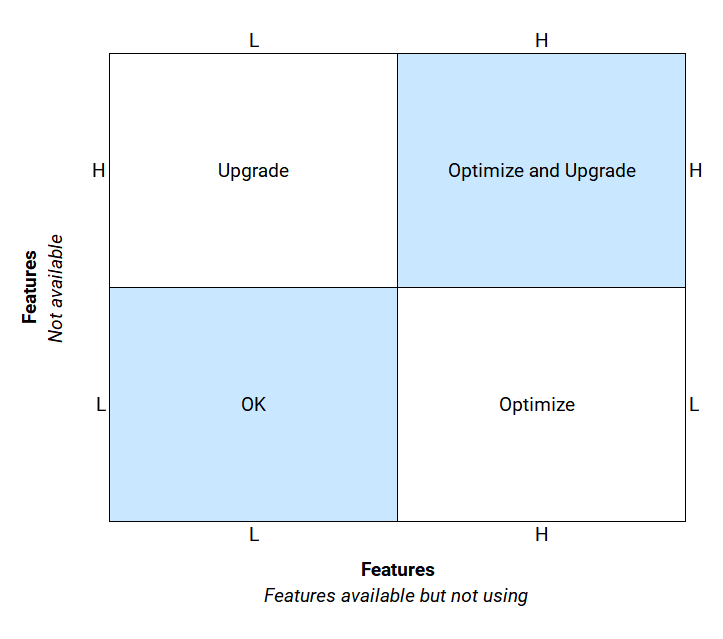
Score 1 indicates the need to optimize your CMMS. Score 2 indicates the need to upgrade your CMMS.
- If scores 1 and 2, both are Low; it is an ideal situation. This indicates that your CMMS is working for you. If the score 1 is high and score 2 is low, it indicates you need to optimize your CMMS. In other words, your CMMS has the features you need, except they are not being used currently. You need to contact your CMMS vendor for help. Maybe you need additional training, or you need to take another look at the implementation. Maybe an outside consultant can help in the process of proper implementation.
- If score 1 and score 2, both, are high, it indicates the need to optimize and upgrade. First, follow the guidelines mentioned earlier for optimizing your CMMS. Before you decide to buy a new package, work with your existing vendor. Perhaps you are using an older version, and the newer version might have many of the features you are looking for, or the vendor might be able to do custom modifications to accommodate your requirements. Try these first and then perform another audit. Make a decision based on this audit.
- If score 1 is low and score 2 is high, it indicates a need to upgrade your CMIMS. In other words, your CMMS does not have the desired features. If your vendor cannot customize the existing package in a reasonable time and for a reasonable cost, you are left with the only option to upgrade to a new CMMS.
Conclusion of Auditing your CMMS
Whether upgrading to a new CMMS or optimizing an existing one, go through the audit of your current CMMS to determine the appropriate plan of action for your situation. Studying why so many CMMS installations have failed and following the proper selection process for your CMMS will help you acquire a CMMS that will work for you for years to come. Otherwise, the latest and greatest technology will yield no better results than the old system did.