



Most Canadian offices still run reception on a paper book. A contractor signs an illegible name, nobody tells the host, and when the fire alarm goes at 3pm no one can say how many guests are inside. Visitor management software exists to close that gap — and in Canada it has to close it without creating a privacy problem of its own.
This guide covers what the category actually does, the Canadian rules that shape it, the lifecycle a visit has to follow, and the difference between the features every system needs and the ones worth paying more for.
What visitor management software actually does
At its simplest, visitor management software replaces the sign-in book with a record. A host registers a guest in advance. The guest arrives, checks in, and the host is notified. The guest checks out, and the record closes.
That sounds administrative until you look at what the record makes possible. You can answer who is in the building right now. You can stop a contractor walking in without a valid safety certificate. You can tell a privacy officer exactly what you hold about a visitor and when it will be deleted. None of those answers exist in a paper book.
The category covers five kinds of arrival, and they do not behave the same way. A meeting guest needs a host and a room. An interview candidate needs discretion. A contractor needs credentials checked. A delivery needs a recipient, not an escort. And the catch-all — anything else — needs a rule for who approves it.
Why Canadian rules shape visitor management software
A visitor record is personal information. That single fact drives most of what follows.
Under PIPEDA’s ten fair information principles, an organisation has to identify why it collects information, limit collection to that purpose, limit how long it keeps it, and safeguard it. Applied to reception, that means a stated purpose, a short retention period that actually runs, and a visitor who cannot read the previous guest’s details on a screen or a page.
Quebec adds a sharper constraint. Before an organisation creates a biometric database — a facial recognition kiosk counts — it must disclose this to the Commission d’accès à l’information at least 60 days beforehand, and express consent is required from each individual. A vendor demo that opens with face recognition is selling you a 60-day delay you had not planned for.
Public sector buyers carry more again. Municipal institutions face new obligations from 1 January 2027, which our guide to municipal space booking sets out in detail. The same analysis applies to a visitor log, because it holds the same class of record.
Accessibility is the rule people forget. If a guest cannot complete check-in from a keyboard or a screen reader, the system has failed at the front door. Designated organisations in Ontario must meet WCAG 2.0 Level AA under the AODA, and the same eight checks in our guide to an accessible booking system apply to a kiosk.
The visit lifecycle your visitor management software has to model
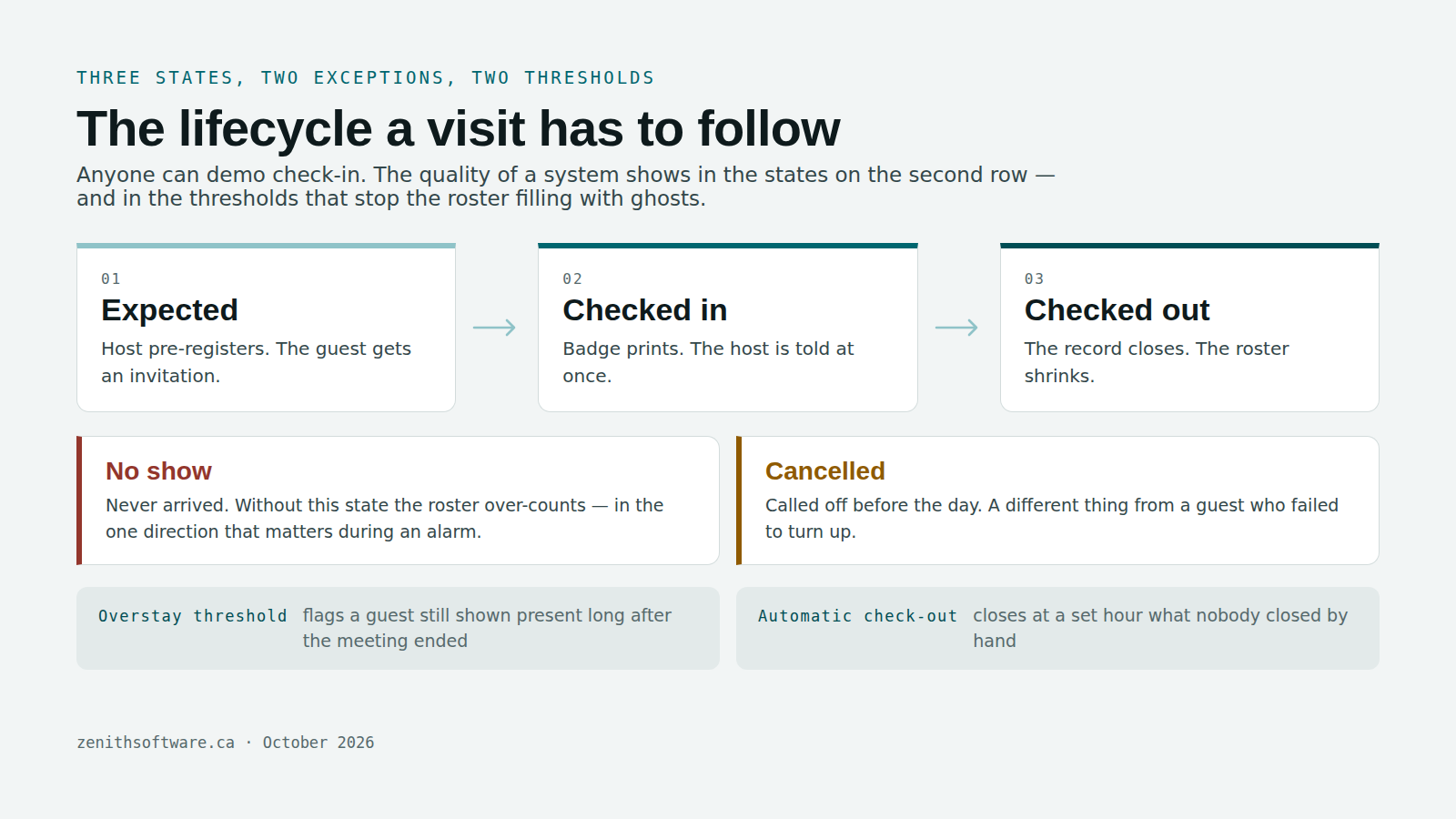
Every serious product models the same five states, and the quality of a system shows in how it handles the two nobody demos.
- Expected. The host pre-registers the visit. The guest gets an invitation with the address, the time and what to bring.
- Checked in. The guest arrives inside the permitted window. The host is notified immediately, and the badge prints.
- Checked out. The guest leaves and the record closes. This is the state most systems lose, because people walk out without stopping at reception.
- No show. The guest never arrived. Without this state, your on-site roster is wrong in the one direction that matters during an evacuation.
- Cancelled. The host called it off before the day.
Two thresholds sit between those states. An overstay threshold flags a guest still shown as present long after the meeting ended. An automatic check-out at a set hour closes records nobody closed by hand. Together they stop the roster filling with ghosts, which is what makes the evacuation list trustworthy rather than decorative.
That roster is not a nice extra. The Canadian Centre for Occupational Health and Safety’s emergency management checklist expects a plan where “all employees and visitors can be accounted for”, with roll call assigned to a named role. A paper book at a burning reception desk does not satisfy that.
Standard features every visitor management system needs
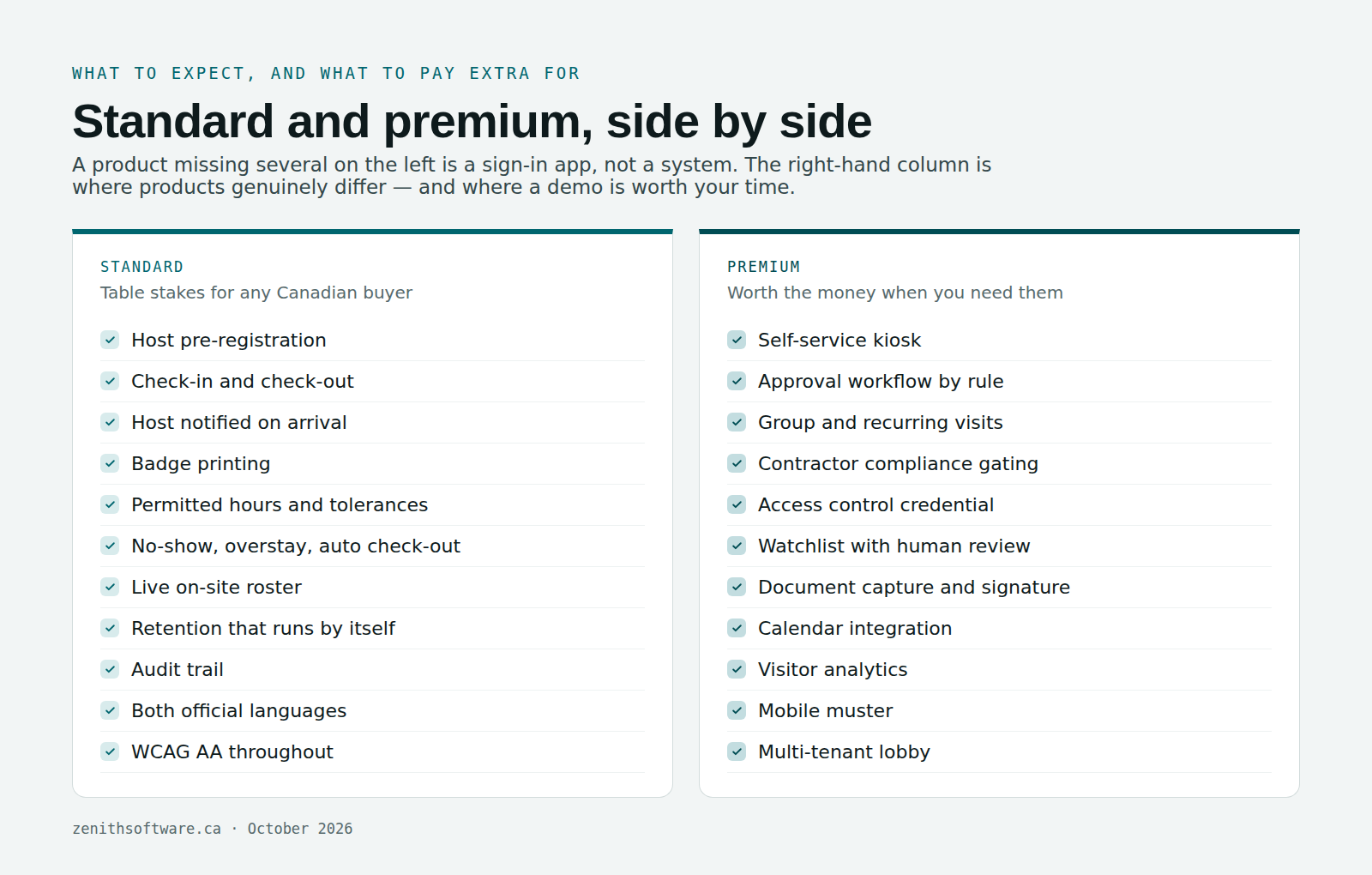
Treat this as the baseline. A product missing several of these is a sign-in app, not a system.
- Host pre-registration, ideally attached to the room booking the guest is coming for.
- A visitor record holding name, organisation, contact details, host, purpose and expected arrival.
- Visit types — meeting, interview, contractor, delivery and other — each with its own rules.
- Check-in and check-out with an enforced state trail, so a record cannot jump from expected to closed.
- Host notification on arrival by email or a chat tool, not a phone call from reception.
- Badge printing from a configurable template.
- Permitted hours per site, with tolerances for guests who arrive early or late.
- No-show and overstay thresholds, plus automatic check-out at a set time.
- Required fields and acknowledgements per site: a safety briefing, a confidentiality notice, a photo where it is justified.
- A live on-site roster you can print or open on a phone at the assembly point.
- A retention period that runs by itself, deleting visitor details on schedule rather than on intention.
- An audit trail of every view and change to a visitor record.
- Both official languages, including the notifications and the refusal messages.
- Accessibility to WCAG AA, with no puzzle or memory test between a guest and the building.
- Canadian data residency, where your policy or your sector requires it.
Premium features that separate visitor management software
These are the capabilities worth paying for, and the ones to probe hardest in a demo.
- Self-service kiosk with a QR code from the invitation, so arrival takes seconds and reception is not a queue.
- Approval workflow configured by rule: everything, nothing, certain visit types only, or anything outside business hours.
- Group and recurring visits for a contractor crew on site for three weeks, registered once rather than sixty times.
- Contractor compliance gating — insurance, safety training, permit to work — checked at the door and refused when expired.
- Watchlist screening with a human review step, never an automatic refusal.
- Access control integration issuing a temporary credential that revokes itself at check-out.
- Document capture and signature, storing the signed agreement against the visit rather than in a drawer.
- Delivery handling that notifies a recipient instead of demanding an escort.
- Calendar integration, so inviting an external guest to a meeting creates the visit automatically.
- Visitor analytics: arrivals by hour, no-show rate, average dwell time and the reception peak you are actually staffing for.
- Mobile muster, letting a fire warden confirm arrivals at the assembly point from a phone.
- Multi-tenant mode for a landlord running one lobby across several tenants.
- Privacy tooling: field-level masking, configurable purge, and an export pack for a privacy impact assessment.
Biometric check-in belongs in a category of its own. It is genuinely useful in high-security settings and genuinely risky everywhere else, and in Quebec it carries the 60-day disclosure above. Treat it as a decision for your privacy officer rather than a feature on a comparison grid.
Visitor management software for schools, sites and shared buildings
The same five states apply everywhere, but each kind of building puts the weight somewhere different.
Schools
Schools already expect visitors to report to the office. Ontario’s Access to School Premises regulation underpins board policies like this one, which asks for signs telling visitors to report to the office and a sign-in record for everyone entering and leaving. Visitor management software turns that record into something the office can search and print during a lockdown drill. Keep student names off any screen a visitor can see, and record volunteers’ screening status rather than the documents themselves.
Plants, depots and construction sites
Here most visitors are contractors. The system should check insurance and safety orientation before check-in, and tie the visit to the work order or permit that brought them on site. That link is what lets you answer, months later, who worked on a machine and when.
Clinics and care homes
Visiting hours, the unit a person is going to, and a record that never shows one family’s details to the next. A paper book at a nursing station fails all three.
Shared office buildings
One lobby serves several tenants. Each tenant should see only its own visitors, while the building keeps one roster for emergencies.
Paper log, sign-in app or platform: which visitor management software do you need?
- Paper log. Fine for a small office with a few guests a week, as long as nobody else can read the page and old pages are actually destroyed.
- A sign-in app on a tablet. Right for one busy reception that mainly needs badges, host alerts and a roster.
- A platform. Worth it when visits connect to rooms, contractors to work orders, or several sites need the same rules and one report. See our guides to meeting room booking systems and desk booking software for the rest of that picture.
What visitor management software costs
Prices vary widely, so compare how each vendor counts rather than the headline number. The common models are:
- Per location per month, usually tiered by features.
- Per device, for each kiosk or reception tablet.
- By visitor volume, with a cap on monthly check-ins.
- Per administrator seat, where hosts and visitors are free.
Then add what the quote leaves out: tablets and stands, badge printers and labels, set-up, and any integration with access control. A low monthly price that charges for every site can cost more than a higher one that does not.
What to ask a vendor
- Show me check-out. Not check-in — anyone can demo check-in. Ask what happens when a guest leaves without stopping.
- Show me the roster during an alarm, on a phone, offline if the building loses power.
- Where is the data, and for how long? Ask for the hosting region and whether the retention period is enforced or advisory.
- What can a receptionist see? An individual’s visit history is a different thing from today’s arrivals list.
- What does the guest see? Ask for a French screen and a keyboard-only run through the whole flow.
- What happens offline? Reception does not stop when the network does.
Where Zenith fits
Zenith treats a visit as part of the workplace record rather than a separate system bolted to the lobby. A host books a room, invites a guest, and the visit sits against that booking — the same booking that our guide to meeting room no-shows shows how to keep honest. Visit types, approval rules, permitted hours, no-show and overstay thresholds, badges, required acknowledgements and retention are all configured per site. The on-site roster comes out of the same records, so it is current by construction rather than by someone remembering to update it.
Because it shares a platform with space reservations, the space register and the maintenance side, a contractor visit and the work order that brought them on site are the same story rather than two. It is Canadian-owned, Canadian-hosted and bilingual in both directions, and the subscription is priced by administrator seats rather than per visitor.
Visits often start with a room booking. Our guide to choosing a meeting room booking system covers that side, and our desk booking software guide covers the desks.
Questions people actually ask
Is visitor management software required by law in Canada?
No law names the software. Several obligations land on what it does, though: privacy law governs the visitor record, occupational health and safety expects you to account for everyone on site, and accessibility legislation covers the screen a guest uses. A paper book can technically satisfy some of those and struggles with the rest.
How long should we keep visitor records?
Long enough to serve the purpose you stated, and no longer. For most offices that is months rather than years. Decide the period deliberately, write it down, and make the system enforce it — an unenforced retention policy is the most common finding in a privacy review.
Does visitor management software need to be accessible?
Yes, and a kiosk is the hardest case. A touchscreen mounted at standing height with small targets and no audio output excludes people at the front door, which is both a legal problem and a visible one. Always provide a second route: a staffed check-in, or the same flow on the guest’s own phone.
Can we use facial recognition for visitor check-in?
In Quebec, not without telling the Commission d’accès à l’information at least 60 days in advance and obtaining express consent. Elsewhere in Canada the privacy analysis is still demanding. Most organisations find a QR code from the invitation does the job with none of the exposure.
What about contractors rather than guests?
Contractors are the strongest argument for the category. They need credentials verified, a safety briefing acknowledged, and a record of exactly when they were on site. That is also where a visit record pays for itself, because it ties to the work they came to do.
Do we need a kiosk?
Not necessarily. A staffed desk with a tablet works well for low volumes, and keeps a human in the loop. A kiosk earns its place when arrivals cluster — a shift change, a training day, a building with one lobby and several tenants.
Where to start
Pick your busiest reception and count one week of arrivals by hour and by type. That single exercise tells you whether you have a queue problem, a compliance problem or a record-keeping problem, and the three need different answers.
Then write down two things before you look at any product: how long you intend to keep a visitor’s details, and who inside your organisation may look at an individual’s visit history. Vendors rarely ask those questions. The answers will narrow your shortlist faster than any feature grid, and your privacy officer will thank you.
If a Canadian-owned, Canadian-hosted option on the same platform as your space and maintenance records belongs on that list, Zenith Workplace is where to start.
Published by Zenith Software Corp., Victoria, British Columbia · October 2026. Practical guidance, not legal advice — confirm every obligation with your own privacy officer and counsel. We verified the external references in October 2026.