

Computer Aid Facility Management (CAFM) software by Zenith
“CAFM Software Canada” is a keyword that facility managers normally use to find local CAFM software in Canada.
What is CAFM Software?
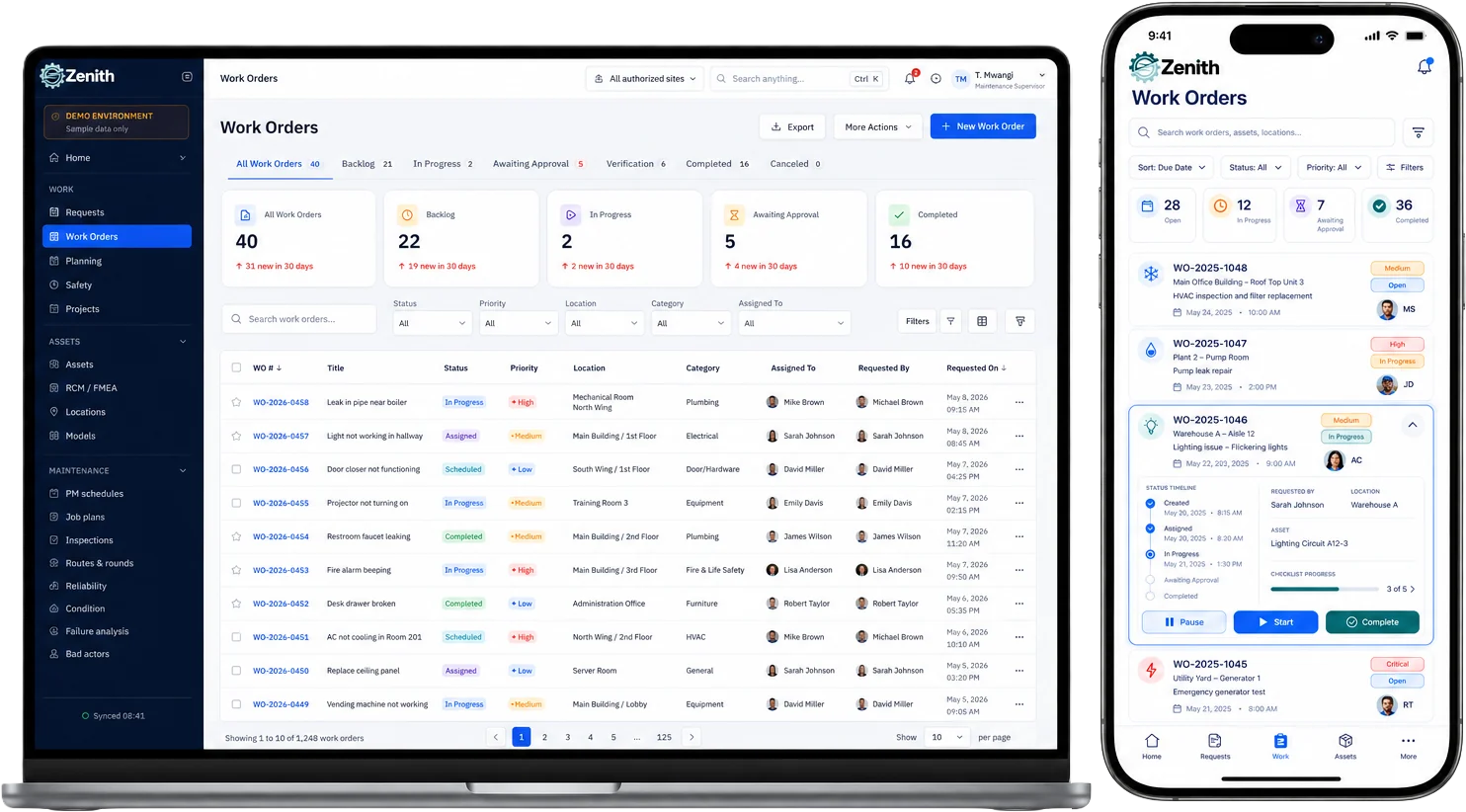
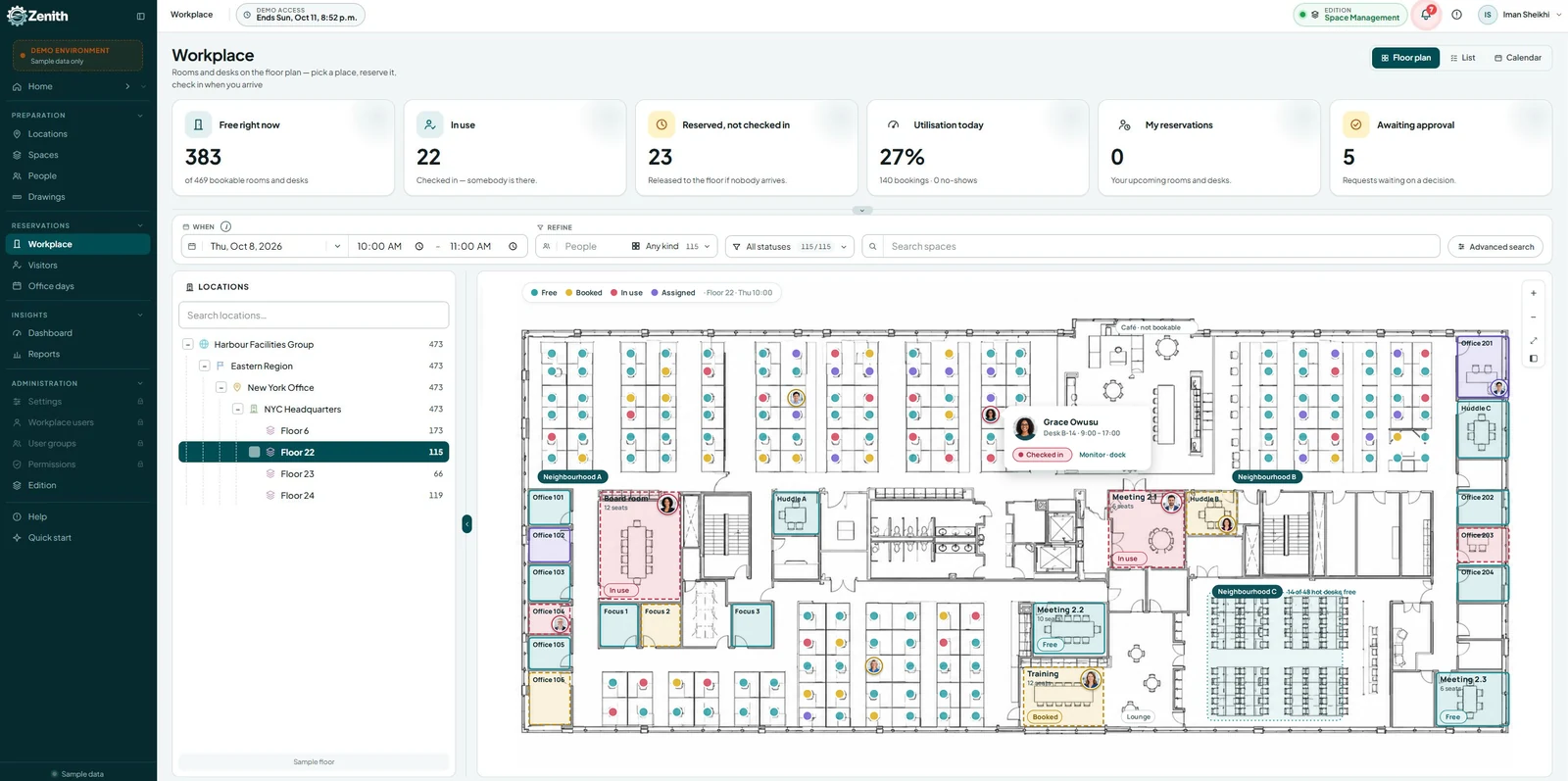
CAFM software, or “Computer-Aided Facility Management” software, is a technological solution designed to assist organizations in overseeing and tracking multiple components of their facilities, such as space utilization, asset oversight, maintenance tasks, room bookings, and energy usage, effectively optimizing facility operations and enabling informed decision-making by offering a unified view of all information related to buildings.
What functionalities does a CAFM system provide?
CAFM systems concentrate on comprehensive facility management tasks and strive to improve the overall efficiency and efficacy of facility operations. It includes activities carried out by different departments such as facility planning, space optimization, asset management, lease administration, and additional functions.
Organizations in Canada implement CAFM Software to:
- Effectively oversee space usage and distribution
- Monitor and manage physical assets throughout their lifecycle
- Facilitate maintenance and work order management
- Enhance move management and space planning activities
- Advance energy management and sustainability efforts
- Produce detailed reports and analytics for better decision-making
- Simplify lease management and monitoring
- Maximize resource distribution and use within the facility
- Simplify vendor management and contract oversight
- Aid in strategic facility planning and budgeting activities.
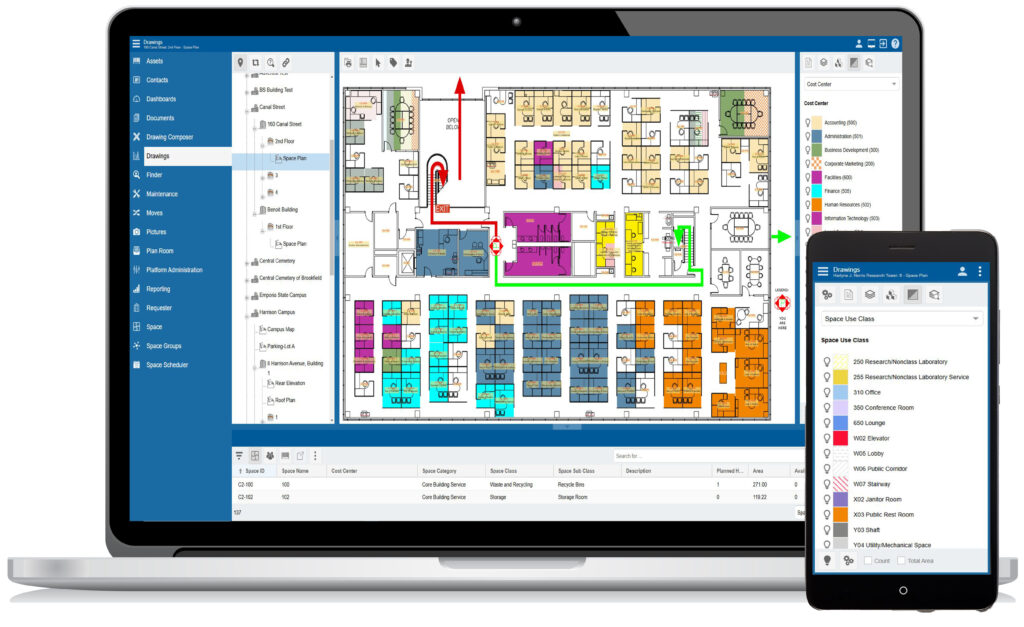
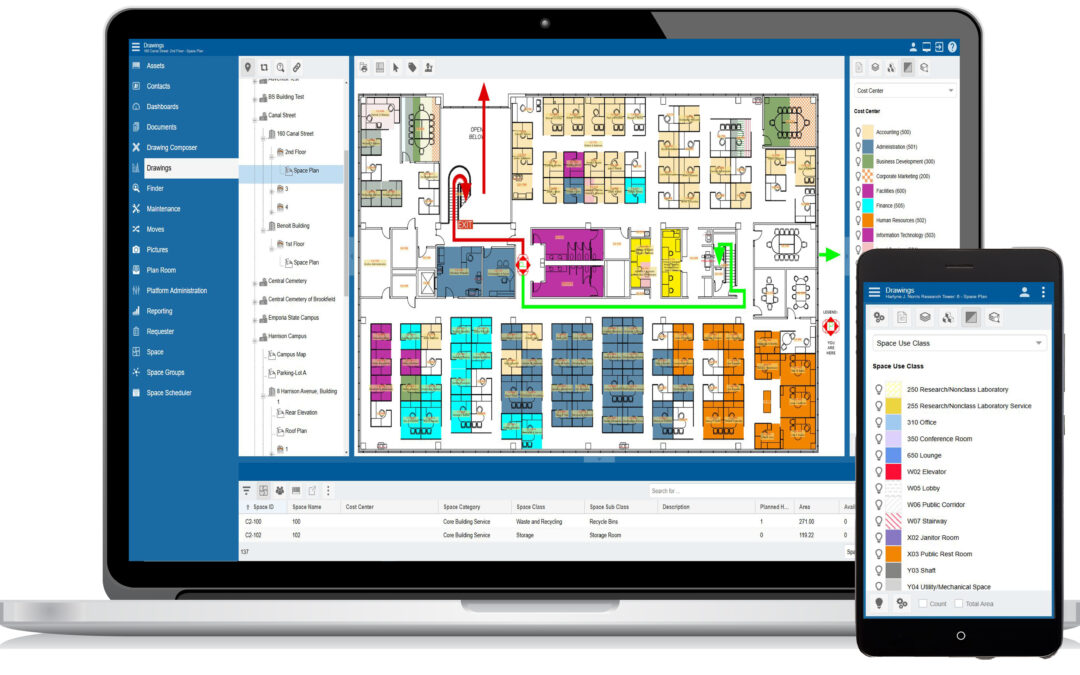
A key feature that sets CAFM software apart from other comparable solutions is their capacity to visualize spaces through CAD (computer-aided drafting) images. Consequently, CAFM software can serve as an essential resource for any organization that requires strategic space planning solutions.
What industries use CAFM software in Canada?
CAFM Software is mainly utilized by organizations that oversee extensive properties with several facilities. These entities typically engage in facility asset management or handle a significant number of occupants. Its application is prevalent in sectors such as:
- Commercial property management
- Healthcare, including hospitals and clinics
- Educational establishments
- Resorts and the hospitality industry
- Multi-site manufacturing operations
- And beyond
Typical functionalities of CAFM Software
Various CAFM systems showcase unique features that set them apart from each other; however, the majority of CAFM systems provide a standard set of functions and attributes. Beyond this baseline, they can become more specialized or sophisticated based on the vendor or specific focus, but at a minimum, CAFM Software typically includes:
- Space management and planning
- Maintenance management
- Management of physical buildings
- Reservation of spaces
- Data reporting
- Analysis of energy performance
Benefits of CAFM
If you oversee facilities management, consolidating all your activities into a single platform might seem overwhelming. Although the features and capabilities may appear beneficial, it can be challenging to grasp how investing in CAFM software could yield significant advantages for your organization.
Below is a summary of the most frequently observed benefits experienced by organizations that utilize CAFM software.
Decreased expenses
CAFM software assists facilities in optimizing their space usage, ensuring that the needs of occupants are addressed and that functional areas are not neglected. Furthermore, improved management of assets and facilities reduces maintenance and replacement expenditures for equipment, as well as energy costs for the premises. Ultimately, any platform that streamlines administrative tasks such as documentation, approvals, and scheduling saves staff time and boosts efficiency, thereby lowering overall operational expenses.
Enhanced productivity
Building on the previous point, CAFM software can improve productivity by centralizing facility management tasks and data for easier access and reference. This makes decision-making simpler and enhances communication among team members. Many also provide features that simplify workflows and approval processes, which shortens routing and approval times and increases the accuracy of information sharing.
Increased employee satisfaction
Workspaces that are comfortable contribute to productivity. By enabling organizations to manage and maintain facilities more effectively and efficiently, employees benefit from environments that foster communication, collaboration, and connection. This reduces stress and ensures a secure workplace.
Empowered facilities managers
CAFM software equips facility managers with the necessary information to excel in their positions. Centralized data, real-time insights, and automated processes facilitate quick and informed decision-making and strategic planning. It can also make task and workload management more straightforward, allowing for easy oversight and optimization of facility operations.
Improved space utilization
A key feature of many CAFM systems is their capability to monitor traffic and occupancy trends over time, aiding facility managers in discovering ways to enhance the layout and utilization of spaces. This is particularly beneficial for organizations experiencing growth or changes in their workforce, such as shifts to hybrid or remote working models. Since facility space is often one of the largest overhead expenses for companies, better space utilization ranks as one of the most significant advantages of a CAFM system.
Sustainability benefits
Any tool that aids organizations in achieving more efficient resource usage also contributes to sustainability. CAFM software fosters environmental responsibility by optimizing resource use, lowering energy consumption, extending asset lifespan, and reducing waste. The data collected by CAFM systems also supports data-driven insights, green building initiatives, and sustainable design and operational practices.
Better reporting
CAFM software grants facility managers access to analytics and reporting that can facilitate informed decision-making. Detailed insights regarding space utilization, maintenance operations, asset performance, and compliance status are invaluable for facilities managers. CAFM platforms that incorporate straightforward and efficient reporting modules ensure that this information is readily available.
CMMS vs. CAFM software:
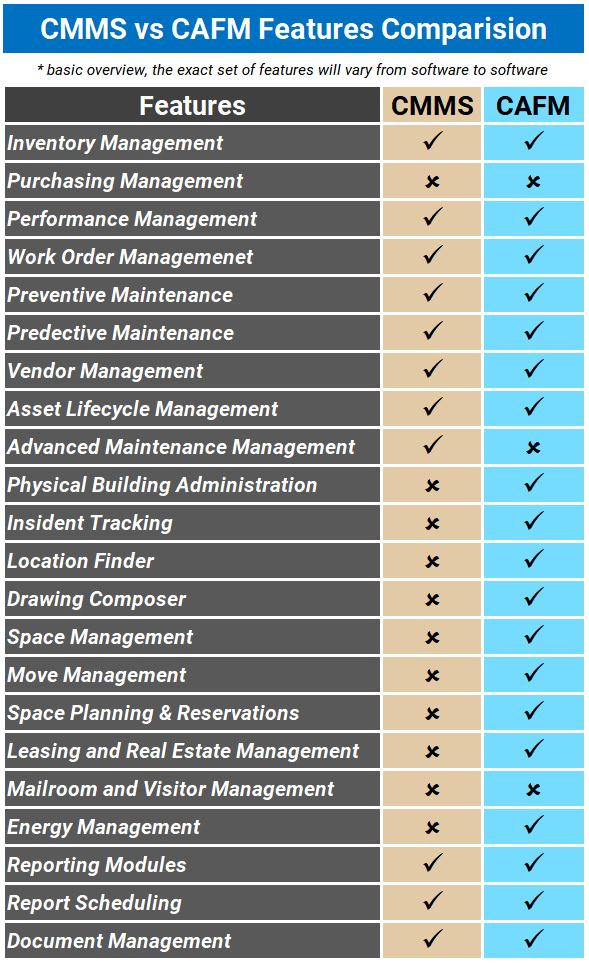
There is a certain level of overlap in the functionalities of CAFM and CMMS (computerized maintenance management system) software, which can sometimes lead to confusion between them. Nevertheless, the two solutions are different in their emphasis, scope, and primary applications.
While a CMMS provides an in-depth approach to managing maintenance tasks, such as handling work orders, scheduling preventive maintenance, managing equipment repairs, and overseeing inventory, a CAFM program is geared towards more extensive facility management operations. Likewise, the focus of a CMMS is primarily on maintenance departments, while CAFM programs tend to be utilized across various departments. Their shared features further highlight these differences. For a more detailed examination of the distinctions, refer to our comprehensive comparison of CMMS and CAFM.
Should CMMS and CAFM be used together?
Although there is some overlap in the features they provide, organizations with intricate facility management requirements may benefit from implementing and integrating both solutions.
Many CAFM systems possess limited capabilities for organizing and handling maintenance tasks. Enhancing a CAFM with a CMMS solution can provide extensive support for all maintenance management processes.
Selecting the appropriate software for your requirements
While CAFM is suitable for organizations seeking comprehensive facility management solutions, many businesses that require a more specialized approach to manage assets, parts inventory, and maintenance tasks might prefer to use or integrate modern CMMS software.
In the end, it all hinges on your organization’s specific requirements. What functionalities do you truly need — and how much are you willing or able to spend on them? To discover more about the options that may be suitable for you, consider starting a free trial or reaching out to arrange a demo!