
If you’ve ever asked yourself “Do I need CMMS software?”, you’re not alone.
Many facility managers, operations directors, and business owners feel a constant tension between:
- Wanting better control, fewer breakdowns, and lower costs, and
- Worrying that CMMS software might be too complex, too expensive, or too disruptive
At Zenith Software, we’ve spoken with many organizations through demos of Zenith CMMS, and we’ve noticed a consistent pattern:
Most organizations don’t reject CMMS because it has no value — they hesitate because they’re unsure whether the value outweighs the effort.
This article exists to answer that question clearly, honestly, and in depth.
By the end, you’ll understand:
- What CMMS software really is (and what it isn’t)
- When CMMS is necessary — and when it isn’t
- The real advantages and measurable ROI
- Common fears around data, adoption, and security (and how to overcome them)
- How CMMS applies to small, mid-size, and large organizations
- Why modern platforms like Zenith dramatically reduce implementation risk
1. What Is CMMS Software (In Plain Language)?
A CMMS (Computerized Maintenance Management System) is software that helps organizations plan, track, manage, and analyze maintenance activities related to:
- Buildings and facilities
- Equipment and assets
- Preventive and corrective maintenance
- Work orders and service requests
- Compliance and inspections
- Maintenance costs and performance
CMMS is NOT:
- Just a ticketing system
- Just a spreadsheet replacement
- Just maintenance scheduling software
CMMS IS:
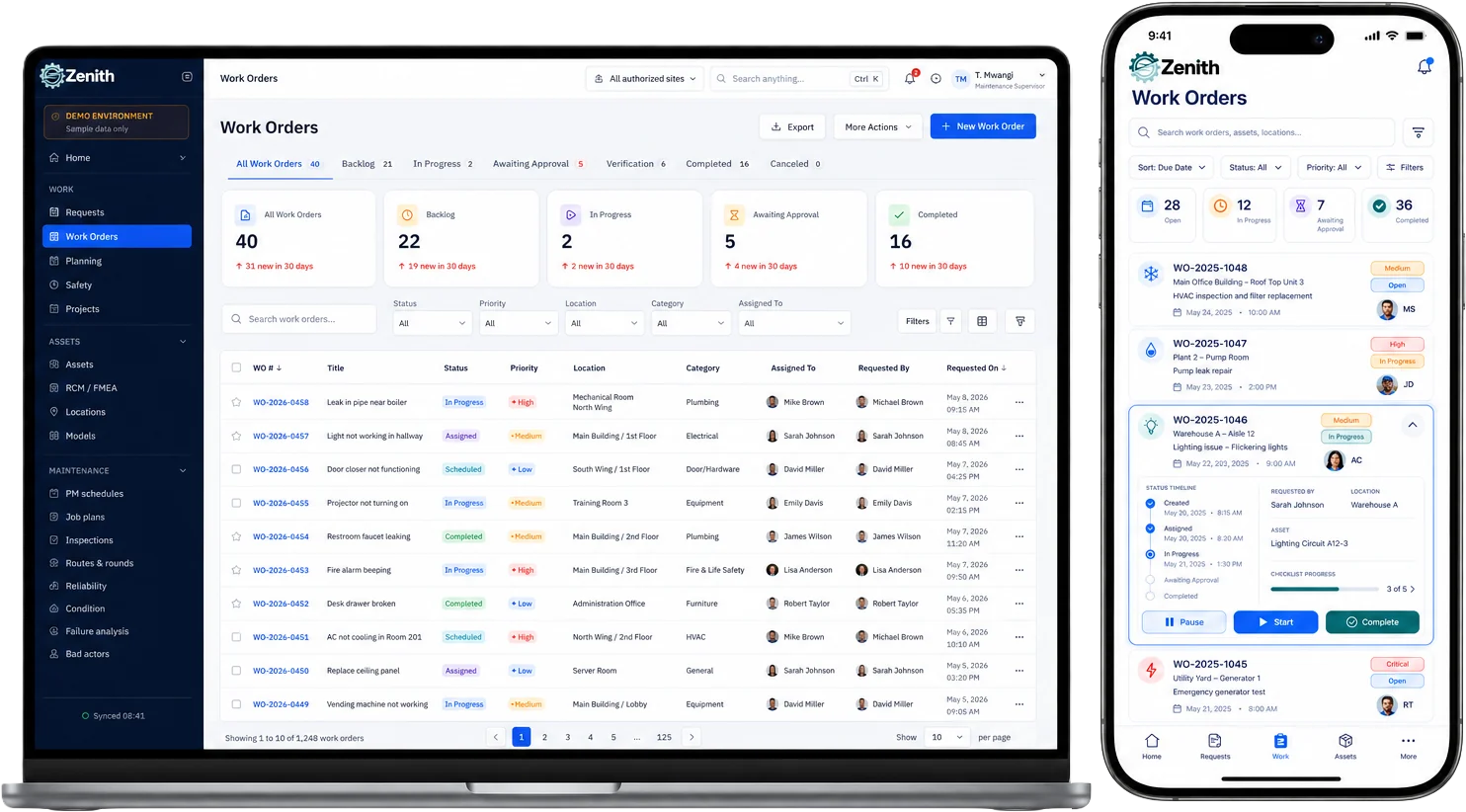
- A central system of record for asset health and facility operations
- A decision-support tool that turns maintenance data into insight
- A long-term cost-reduction and risk-management platform
If spreadsheets are your “memory,” CMMS is your institutional brain.
2. Why Do Organizations Hesitate to Implement CMMS?
When people ask “Do I need CMMS software?”, they’re often really asking one of these questions:
- “Are we big enough to justify it?”
- “Will my team actually use it?”
- “Is the data entry worth the effort?”
- “What if implementation fails?”
- “What about security and access?”
- “Will it slow us down instead of helping?”
These are valid concerns — and ignoring them leads to failed implementations.
Let’s address them head-on.
3. Life Without CMMS vs. Life With CMMS
Before CMMS
- Maintenance is reactive
- Information is scattered (emails, spreadsheets, whiteboards)
- Equipment history is incomplete or missing
- Costs are hard to trace
- Knowledge lives in people’s heads
- Reporting is manual and time-consuming
After CMMS
- Maintenance is planned and predictable
- All asset data lives in one place
- Downtime is reduced
- Costs are measurable and defensible
- New staff ramp up faster
- Leadership sees real-time performance
Comparison Table
← Scroll horizontally to view the full comparison →
| Area | Without CMMS | With CMMS |
|---|---|---|
| Work Orders | Emails, phone calls, verbal requests, and manual follow-ups | Centralized digital work orders with full tracking and history |
| Preventive Maintenance | Often forgotten or tracked manually in spreadsheets | Automated schedules, reminders, and recurring tasks |
| Asset History | Scattered records or undocumented maintenance | Complete lifecycle history attached to each asset |
| Downtime | Unexpected failures and emergency repairs | Planned maintenance with reduced unplanned downtime |
| Maintenance Costs | Difficult to measure or justify | Transparent tracking of labor, parts, and total cost |
| Reporting | Manual spreadsheets and time-consuming summaries | Real-time dashboards and automated reports |
| Decision Making | Based on assumptions and tribal knowledge | Data-driven insights and performance metrics |
| Team Productivity | Reactive, interrupted workflows | Structured, prioritized, and efficient operations |
| Compliance & Safety | Paper-based logs and risk of missing inspections | Digital audit trails and inspection records |
4. Do Small Organizations Need CMMS Software?
Short answer: Yes — but only if it’s right-sized.
Small organizations often believe CMMS is “for later.”
In reality, early adoption often delivers the highest ROI.
Examples:
- Small manufacturing plants
- Independent schools
- Medical clinics
- Property managers with a few buildings
- Churches and community centers
Why CMMS Matters for Small Teams
- One unexpected failure can halt operations
Small teams rarely have backup resources. A single breakdown can stop production, service delivery, or occupancy entirely. - Knowledge loss when one key person leaves is devastating
Maintenance knowledge often lives in one person’s head. CMMS preserves procedures, history, and context so operations don’t depend on individuals. - Preventive maintenance saves disproportionately more money
For small budgets, avoiding even one major emergency repair can justify the entire CMMS investment. - Small teams can’t afford inefficiency
Manual tracking, duplicate work, and missed requests consume time that small teams simply don’t have. - Reactive maintenance creates constant stress
Firefighting becomes the norm, leading to burnout and inconsistent service quality. - CMMS reduces dependence on memory and guesswork
Tasks, schedules, and asset details are always visible — no mental tracking required. - Faster onboarding for new staff or contractors
New hires can become productive quickly by following documented workflows and asset histories. - Easier justification of maintenance decisions
Even in small organizations, leadership often asks “Why are we spending this?” CMMS provides clear answers. - Better vendor and contractor coordination
Work orders, asset details, and site information are available without endless back-and-forth emails. - Small organizations grow faster than their processes
CMMS prevents growing pains by creating structure early — before chaos sets in. - Improves credibility with stakeholders
Schools, clinics, property owners, and boards gain confidence when maintenance is organized and transparent. - You don’t need enterprise complexity to get value
A right-sized CMMS delivers benefits without heavy implementation or overhead.
Key requirement:
A CMMS for small organizations must be easy, flexible, and scalable — not enterprise-heavy.
5. CMMS for Mid-Size Organizations: Where It Becomes Essential
This is where the question “Do I need CMMS software?” almost always becomes “We can’t keep doing this manually.”
Common Triggers
- Multiple facilities or locations
Managing maintenance across more than one site quickly exposes process gaps and communication issues. - Growing maintenance teams
As teams expand, informal coordination breaks down and accountability becomes unclear. - Increasing compliance requirements
Inspections, audits, and documentation demands become harder to manage manually. - Budget scrutiny from leadership
Maintenance spending must be justified with data, not explanations. - Rising volume of service requests
Email- and phone-based requests become unmanageable and error-prone. - Inconsistent service levels across locations
Different sites begin operating with different standards and expectations. - Dependence on spreadsheets and tribal knowledge
Manual tools no longer scale with operational complexity.
Without CMMS
- Chaos scales faster than efficiency
Problems multiply as the organization grows, but processes do not. - Reporting becomes painful and time-consuming
Pulling data for leadership or audits turns into a manual exercise. - Preventive maintenance is inconsistent
Tasks are skipped, delayed, or forgotten as workload increases. - Work orders fall through the cracks
Requests are lost, duplicated, or delayed due to lack of visibility. - Managers lack real-time insight
Decisions are made without knowing workload, backlog, or asset health. - Maintenance becomes reactive by default
Teams spend more time responding to failures than preventing them.
With CMMS
- Standardized maintenance processes across all sites
Every facility follows the same workflows, expectations, and priorities. - Measurable KPIs and performance tracking
Leadership gains visibility into response times, backlog, and asset performance. - Easier budgeting and forecasting
Historical data supports accurate cost planning and resource allocation. - Clear accountability at every level
Everyone knows who is responsible for what — and when. - Consistent preventive maintenance execution
Schedules run automatically instead of relying on reminders. - Improved coordination between teams and locations
Information flows through one system instead of multiple channels. - Confidence in operational decisions
Maintenance strategy is driven by data, not urgency.
Mid-size organizations benefit most from integrated CMMS + CAFM platforms like Zenith.
6. Large Enterprises: CMMS Is No Longer Optional
For large organizations, CMMS isn’t a “nice to have” — it’s infrastructure.
Typical users:
- Hospitals
- Universities
- Airports
- Government buildings
- Manufacturing campuses
- Corporate real estate portfolios
Risks Without CMMS
- Compliance failures
Missed inspections, incomplete records, and inconsistent documentation can lead to fines, failed audits, or regulatory action. - Safety incidents
Poorly tracked maintenance increases the risk of equipment failures that can cause injuries, liability exposure, and reputational damage. - Massive downtime costs
In large operations, even a short outage can result in significant financial loss, service disruption, or public impact. - Loss of institutional knowledge
When experienced staff retire or leave, undocumented procedures and asset history disappear with them. - Inability to justify maintenance budgets
Without accurate data, maintenance is viewed as a cost center instead of a value driver. - Fragmented visibility across departments and sites
Leadership lacks a unified view of asset health and maintenance performance. - Delayed response to critical issues
Without centralized tracking, urgent problems can be missed or escalated too late. - Higher long-term asset replacement costs
Assets fail earlier due to missed preventive maintenance and lack of lifecycle planning. - Reduced confidence from stakeholders and regulators
Poor maintenance transparency undermines trust with boards, executives, and oversight bodies. - Increased operational and legal risk
Lack of traceability makes it harder to defend decisions after incidents or failures.
At this scale, CMMS becomes a strategic system, not just a maintenance tool.
7. The Real Advantages of CMMS (Beyond Maintenance)
1. Cost Control
- Track labor, parts, and downtime accurately
Understand where money is being spent and which assets consume the most resources. - Identify chronic failures and cost drivers
Spot repeat issues that signal deeper problems instead of repeatedly fixing symptoms. - Justify maintenance budgets with data
Replace subjective explanations with clear, defensible numbers for leadership. - Reduce emergency and overtime expenses
Planned work is almost always cheaper than reactive work.
2. Asset Lifecycle Optimization
- Extend asset lifespan
Consistent preventive maintenance keeps assets operating longer and more reliably. - Plan replacements proactively
Replace assets based on condition and performance — not sudden failure. - Reduce emergency repairs and downtime
Fewer surprises mean less disruption and lower stress for teams. - Make smarter capital planning decisions
Asset history supports long-term investment planning.
3. Operational Visibility
- See what’s happening across all facilities
Real-time insight into work orders, assets, and maintenance status. - Understand backlog, workload, and team performance
Balance resources effectively and prevent bottlenecks. - Make informed, data-driven decisions
Maintenance strategy becomes proactive instead of reactive. - Improve communication between teams and management
Everyone operates from the same source of truth.
4. Compliance & Risk Reduction
- Maintain inspection and compliance records
Ensure nothing is missed and documentation is always accessible. - Create clear audit trails
Demonstrate accountability during audits and investigations. - Improve safety documentation and tracking
Reduce liability by proving that safety procedures are followed. - Lower regulatory and operational risk
Proactive maintenance reduces incidents before they occur.
5. Knowledge Retention
- Keep maintenance history attached to each asset
Work performed today benefits future teams. - Reduce reliance on tribal knowledge
Critical information is documented instead of stored in people’s heads. - Enable smoother staff transitions
New employees and contractors ramp up faster with clear records. - Protect the organization from knowledge loss
Operational intelligence remains even when people leave.
8. CMMS Implementation Challenges (And How to Avoid Them)
Challenge 1: “We don’t have clean data”
Reality: No one does at the start
Solution: Start Small and Build Momentum
- Start small
Focus on a limited scope at the beginning instead of trying to model everything at once. Early wins build confidence and adoption. - Capture critical assets first
Begin with assets that are:- High-risk
- High-cost
- Business-critical
This delivers immediate value without overwhelming the team.
- Improve data quality over time
CMMS data does not need to be perfect on day one. Accuracy improves naturally as work orders are completed and history accumulates. - Avoid “big-bang” implementations
Gradual onboarding reduces disruption and lowers the risk of failure. - Let real work drive better data
Asset records improve organically as technicians use the system in daily operations. - Prioritize usefulness over completeness
Useful, actionable data is more valuable than large amounts of unused information. - Adjust workflows as you learn
Early feedback helps refine processes instead of locking in assumptions. - Build trust in the system first
Once teams see value, they willingly contribute better data.
Zenith supports incremental onboarding, not “all at once” chaos.
Challenge 2: User Adoption
Reality: People resist tools that slow them down.
Solution: Design for Real Users, Not Just Features
- Simple, intuitive interfaces
Technicians should be able to complete tasks without training manuals. Fewer clicks and clear screens lead to faster adoption. - Mobile-friendly workflows
Maintenance work happens in the field, not at a desk. A CMMS must work smoothly on phones and tablets. - Clear value to technicians
Users adopt systems that make their job easier — not ones that only benefit management. - Fast work order creation and updates
Logging work should take seconds, not minutes. - Minimal data entry for technicians
Capture essential information without overwhelming users with forms. - Easy access to asset information on-site
Drawings, manuals, and history should be available at the point of work. - Consistent workflows across tasks
Predictable steps reduce confusion and errors. - Immediate feedback and visibility
Technicians should see the impact of their work reflected in the system. - Reduce “extra work” perception
When CMMS replaces paperwork instead of adding to it, adoption follows naturally.
Zenith is designed around actual maintenance workflows, not theoretical ones.
Challenge 3: Over-Customization
Reality: Over-engineering kills CMMS projects.
Solution: Standardize First, Customize with Purpose
- Start with standard workflows
Use proven maintenance processes before introducing customization. Standards reduce confusion and speed up adoption. - Avoid over-engineering early
Complex rules and custom logic often create friction before real value is established. - Customize only where value is proven
Make changes based on real operational needs — not assumptions. - Let usage data guide customization
Identify bottlenecks and inefficiencies through actual system use before modifying workflows. - Preserve consistency across teams and sites
Standardization ensures everyone works the same way, especially in multi-location environments. - Reduce training and support effort
Fewer custom paths mean faster onboarding and less dependency on specialists. - Ensure upgrades remain simple
Excessive customization can make future updates risky and expensive. - Focus customization on outcomes, not preferences
Customize to improve efficiency, safety, or compliance — not just personal habits. - Build flexibility gradually
As confidence grows, targeted customization becomes a strategic advantage instead of a risk.
9. Data Security & Privacy Concerns
A very common hesitation we hear:
“What happens to our data?”
Data Security & Privacy: Legitimate Concerns vs. Modern CMMS Practices
Legitimate Concerns
- Unauthorized access
Fear that sensitive facility, asset, or operational data could be accessed by the wrong people. - Data ownership
Uncertainty about who truly owns the data once it lives inside a CMMS platform. - Cloud security
Concerns that cloud-based systems are less secure than on-premise solutions. - Compliance requirements
Worries about meeting industry, regulatory, or internal governance standards. - Vendor lock-in
Fear of losing control or access to data if the relationship with a vendor changes. - Data loss or service disruption
Concerns about backups, system availability, and disaster recovery.
Modern CMMS Best Practices
- Role-based access control (RBAC)
Users only see and access what they are authorized to, reducing risk and exposure. - Encrypted data storage and transmission
Data is protected both at rest and in transit using modern encryption standards. - Secure hosting environments
Systems are hosted in professionally managed, monitored, and hardened infrastructures. - Clear data ownership policies
Customers retain ownership of their data, with transparent export and access options. - Audit logs and activity tracking
Every change is recorded, improving accountability and traceability. - Regular backups and disaster recovery planning
Ensures data availability even in the event of outages or incidents. - Compliance-aligned system design
CMMS platforms are built to support regulatory and operational requirements, not bypass them.
Zenith is built with enterprise-grade security principles, even for smaller organizations — because security should never be optional.
10. Is CMMS Worth the Effort? The ROI Question
Let’s reframe the question.
Instead of asking:
“Do I need CMMS software?”
Ask:
“What is the cost of continuing without one?”
Hidden Costs of Not Using a CMMS
- Emergency repairs
Reactive fixes cost significantly more than planned maintenance and often require premium parts or rushed service. - Overtime labor
Breakdowns rarely happen during business hours, leading to overtime, fatigue, and burnout. - Asset replacement too early
Without proper maintenance history, assets are replaced prematurely instead of being optimized for full lifecycle value. - Compliance risk
Missing records or inspections can result in fines, failed audits, or operational shutdowns. - Lost productivity
Downtime affects not only maintenance teams but also operations, staff, customers, and occupants. - Poor decision making
Without reliable data, decisions are based on assumptions rather than facts. - Unplanned downtime ripple effects
One failure often triggers delays, rescheduling, and customer dissatisfaction across the organization. - Increased contractor dependency
Lack of internal visibility leads to overuse of external vendors at higher cost. - Budget overruns and surprises
Maintenance spending becomes unpredictable and reactive. - Erosion of leadership confidence
When maintenance issues appear “out of control,” trust and credibility suffer.
Most organizations recover CMMS costs within the first year — often much sooner.
11. Why Many CMMS Implementations Fail
Failures rarely come from the software itself.
They Come From:
- Poor onboarding
Teams are handed software without guidance, context, or a clear rollout plan, leading to confusion and frustration. - Overly complex systems
Feature-heavy platforms overwhelm users before they see any real benefit. - Lack of executive support
Without leadership backing, CMMS adoption becomes optional instead of strategic. - Unrealistic expectations
Expecting perfect data, instant ROI, or full adoption on day one sets the project up for disappointment. - Trying to model everything upfront
Overplanning delays value and increases resistance. - Insufficient change management
People are asked to change habits without understanding why. - Focusing on software instead of outcomes
Tools are implemented without tying them to real operational goals. - Ignoring technician feedback
Systems fail when the people who use them daily are not involved.
This is why simplicity and guidance matter more than features.
How Successful CMMS Projects Succeed
Successful CMMS projects don’t start with software — they start with clarity, alignment, and realistic execution.
They Succeed Because They:
- Begin with clear goals
The organization knows why it is implementing CMMS — reducing downtime, improving compliance, or gaining visibility. - Focus on quick, visible wins
Early success builds trust and momentum among users and leadership. - Start simple and expand gradually
Core workflows are established first before adding complexity. - Have strong executive support
Leadership actively reinforces adoption and treats CMMS as a strategic system, not an optional tool. - Design workflows around real users
Processes match how technicians actually work, not how software expects them to. - Invest in proper onboarding and guidance
Users understand not just how to use the system, but why it matters. - Engage technicians early
Feedback from frontline users improves usability and increases ownership. - Set realistic expectations
Teams understand that data quality and ROI improve over time, not overnight. - Use data to drive continuous improvement
CMMS becomes a living system that evolves with operational needs. - Treat CMMS as a long-term asset
The platform grows alongside the organization instead of being replaced every few years.
12. Why Zenith Is Different
Zenith was designed based on real facility operations, not just feature checklists.
What Makes Zenith Approachable
- Modular design — use only what you need
Organizations can start with core CMMS functionality and add modules over time, avoiding unnecessary complexity. - Integrated CMMS + CAFM in one platform
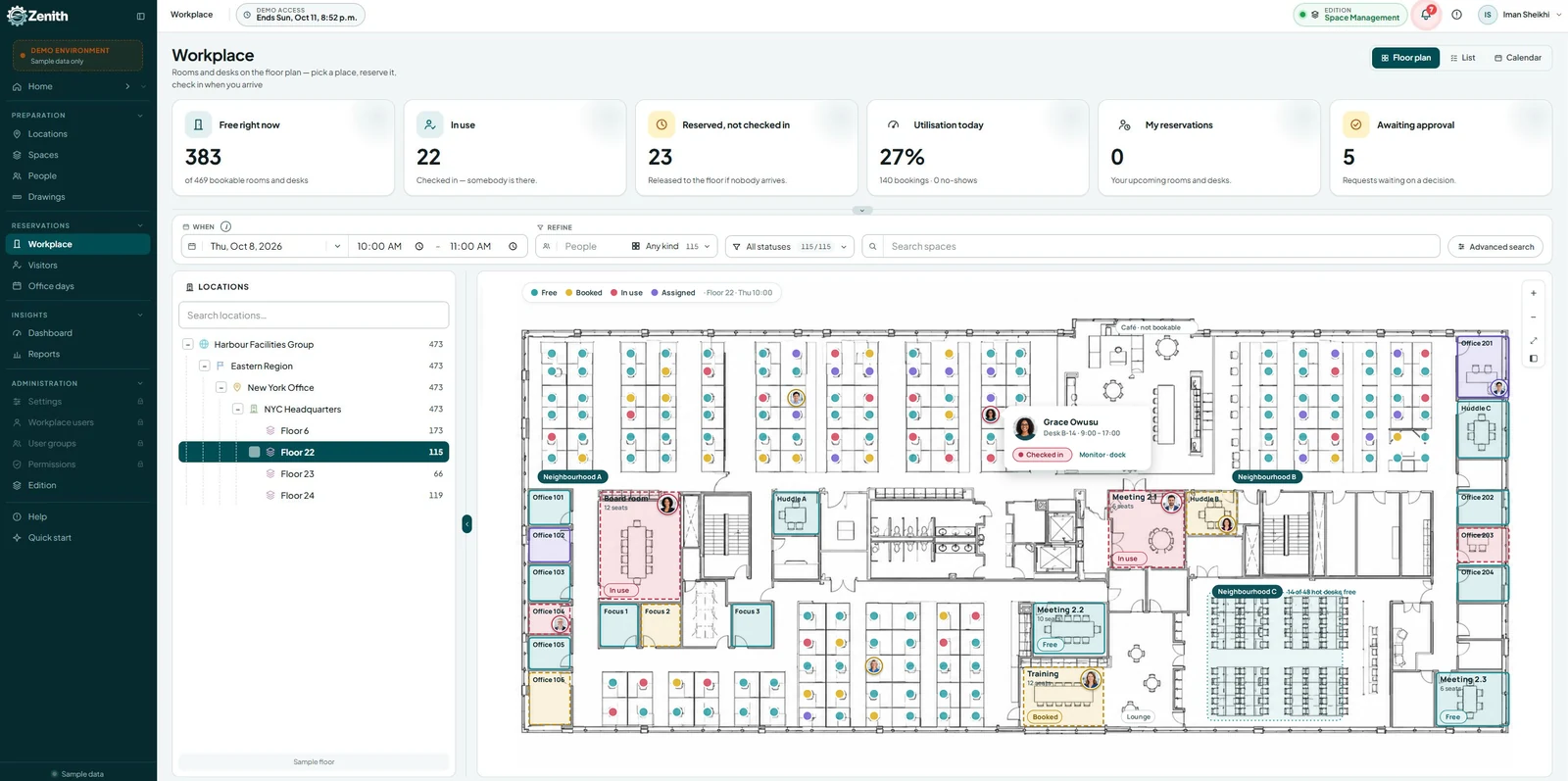
Maintenance, assets, spaces, and facilities data live in a single system instead of disconnected tools. - Visual floor plans and space context
Work orders and assets are tied to real locations, improving understanding and reducing errors. - Gradual implementation approach
Zenith supports phased onboarding so teams can adopt the system at a comfortable pace. - Designed around real facility workflows
Features reflect how maintenance teams actually work, not theoretical process models. - Scales with your organization
Zenith grows from small teams to complex, multi-site environments without forcing a system change.
Why Organizations Shouldn’t Worry About “Trying It”
- No forced complexity
You’re not required to configure everything upfront or adopt features you don’t need. - No big-bang rollout
Implementation can begin with a single site, asset group, or workflow. - No unnecessary data overload
Start with essential information and let data maturity develop naturally. - Low disruption to daily operations
Teams can continue working while gradually adopting the system. - Clear value before full commitment
Organizations can experience real benefits before expanding usage. - Designed to build confidence, not pressure
Zenith earns adoption through usability and results, not mandates.
Zenith grows with your confidence, not ahead of it.
13. So… Do I Need CMMS Software?
You likely DO if:
- Maintenance is mostly reactive
- Asset history is fragmented
- Downtime is costly
- Growth is stressing your processes
- Decisions rely on guesswork
You may NOT (yet) if:
- You have very few assets
- Maintenance is rare and non-critical
- Risks are minimal
But most organizations reach a tipping point — and when they do, CMMS shifts from “optional” to essential.
14. Final Thoughts
Asking “Do I need CMMS software?” is a sign of maturity — not hesitation.
The right CMMS:
- Reduces stress
- Improves reliability
- Protects investments
- Enables smarter growth
The wrong CMMS — or the wrong approach — creates fear.
Our goal with Zenith is to remove that fear.
Ready to Explore CMMS Without the Risk?
If you’re still unsure, that’s okay.
The next step isn’t commitment — it’s clarity.
Learn more about Zenith CMMS
See how it fits your facility, not the other way around
Frequently Asked Questions (FAQ) About Zenith CMMS
1. Do I really need CMMS software like Zenith?
If maintenance is mostly reactive, data is scattered, or decisions rely on guesswork, a CMMS is no longer optional.
Zenith helps organizations move from reactive maintenance to structured, data-driven operations — at a pace that fits their readiness.
2. Is Zenith suitable for small organizations, or only large enterprises?
Zenith is designed for small, mid-size, and large organizations.
Its modular approach allows small teams to start simple, while larger organizations can scale without switching platforms.
3. How long does it take to implement Zenith?
Implementation is gradual, not all-or-nothing.
Many organizations start seeing value within weeks by focusing on:
- Critical assets
- Core workflows
- One facility or team
Full maturity develops over time — without disrupting daily operations.
4. Do we need perfect data before starting?
No.
Zenith is built for progressive data improvement. You can start with minimal information and refine data quality naturally as work orders and maintenance history accumulate.
5. Will our technicians actually use it?
Zenith is designed around real technician workflows, not just management reporting.
Simple interfaces, mobile-friendly access, and clear value to daily tasks significantly improve adoption.
6. How does Zenith handle data security and privacy?
Zenith follows modern CMMS security best practices, including:
- Role-based access control
- Encrypted data storage
- Secure hosting environments
- Clear data ownership policies
Your organization retains ownership and control of its data.
7. Can Zenith integrate maintenance with space and facility management?
Yes.
Zenith combines CMMS + CAFM in a single platform, linking assets, maintenance, spaces, and floor plans for better visibility and decision-making.
8. What if our needs change or grow over time?
Zenith is built to scale with your organization.
You can add modules, workflows, and complexity only when they deliver proven value — without reimplementation.
9. Is Zenith difficult to customize?
Customization is optional and intentional.
Zenith encourages starting with standard workflows and customizing only where value is proven, keeping upgrades simple and risk low.
10. What’s the risk of “trying” Zenith?
Very low.
There’s:
- No forced complexity
- No big-bang rollout
- No unnecessary data overload
Organizations can explore Zenith at their own pace and expand only when confident.