
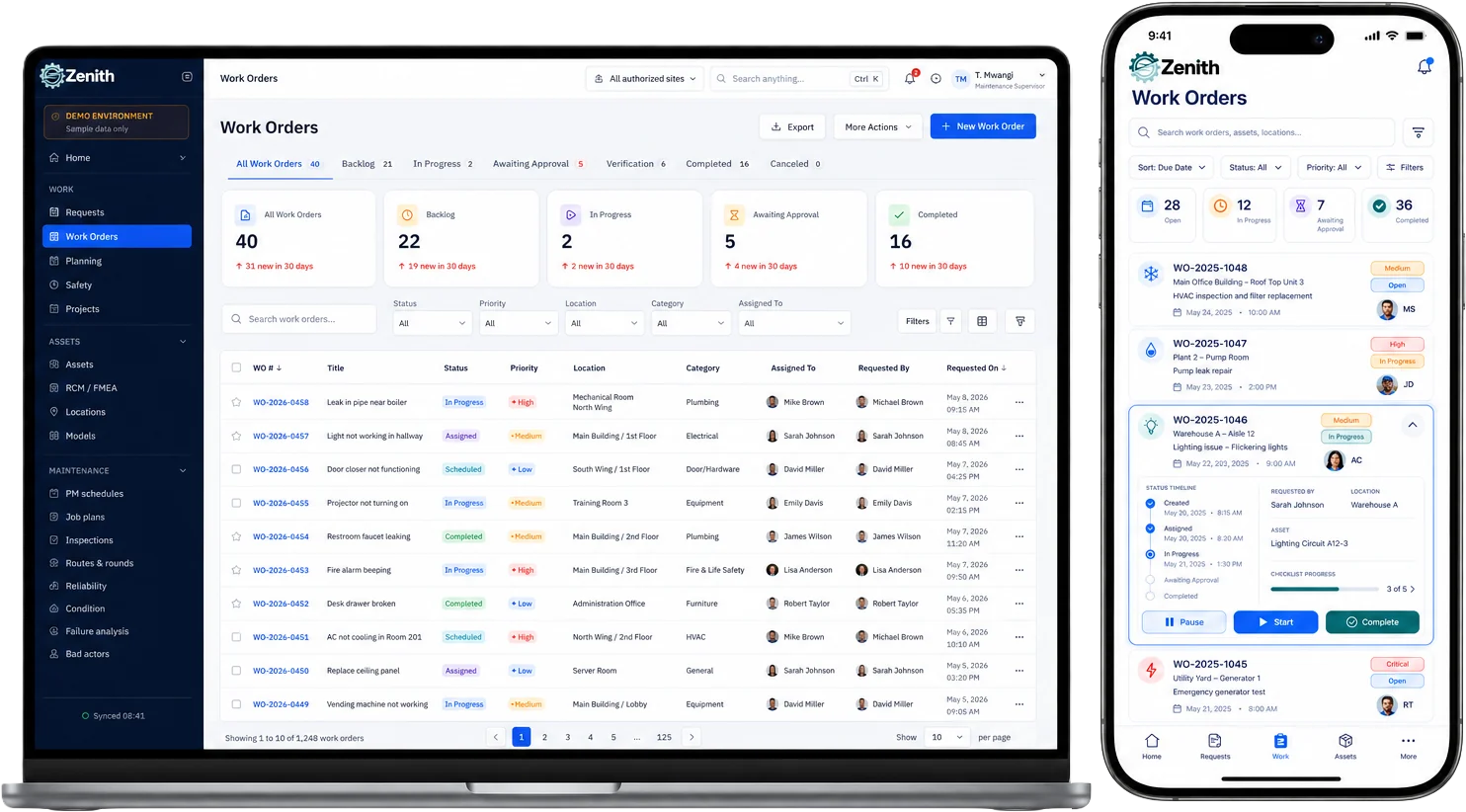
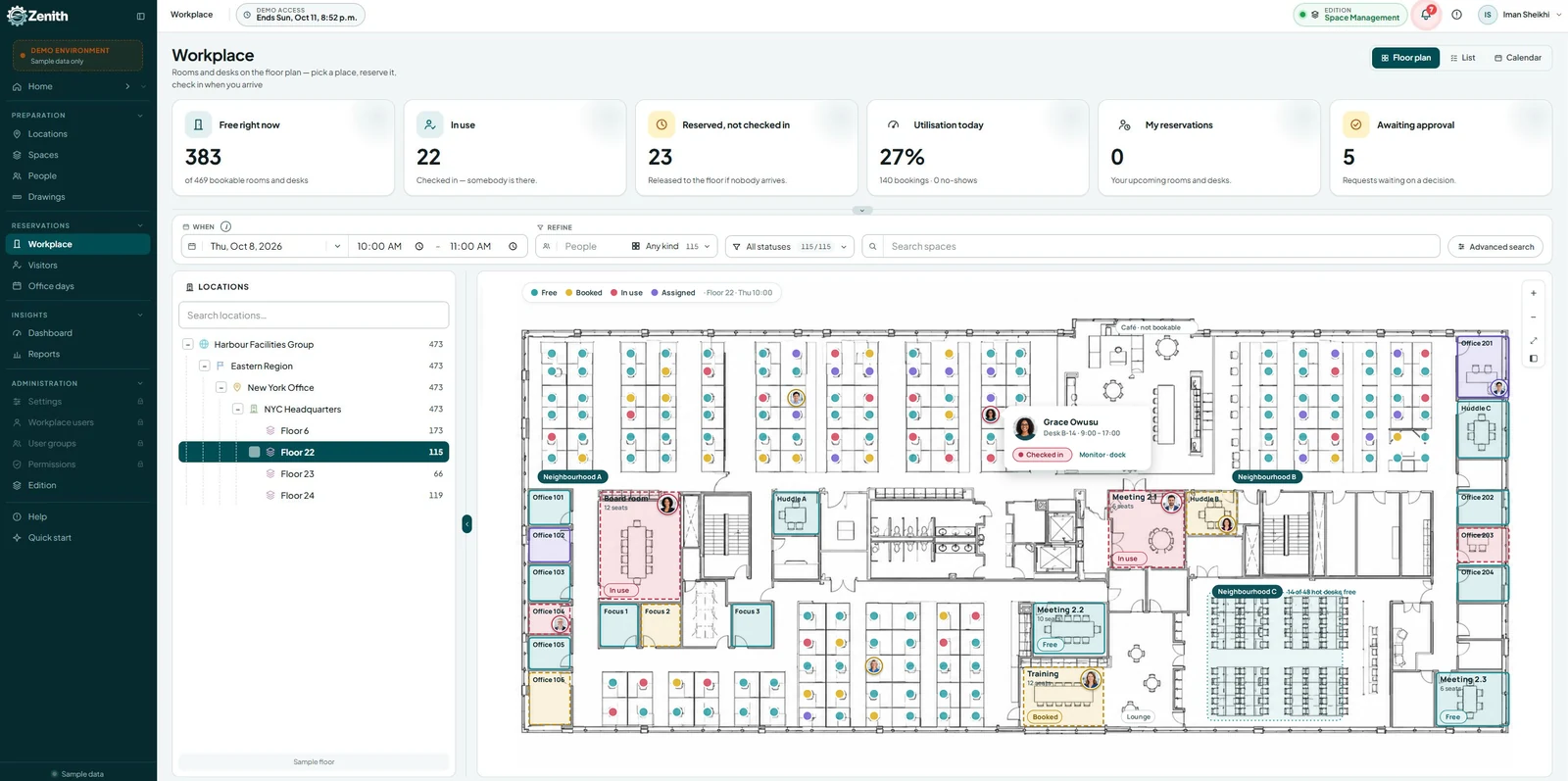


In 2025, Canadian organizations are rethinking how they manage their physical and digital environments. Workspace Management Software is now essential—not just for booking desks or tracking assets, but for enabling hybrid work, predictive maintenance, and secure, scalable operations. This guide explores what Canadian companies need from Workspace Management Software and how Zenith delivers tailored solutions. Choosing the right Workspace Management Software helps reduce real estate costs and improve employee experience.
Executive summary
- Canadian organizations need WorkSpace managment software that supports hybrid work, integrates AI for predictive maintenance and scheduling, enforces security and data residency, and scales modularly to control costs and speed adoption.
- Vendors must deliver demo-ready datasets, clear onboarding documentation, and verticalized templates to shorten time-to-value.
- Zenith offers an integrated platform and implementation approach that addresses these requirements: hybrid-first tools, AI-driven workflows, hierarchical asset and location registries, Canadian hosting options, and phased pricing that fits growth cycles.
Why Workspace Management Software Matters in 2025
- Hybrid work is normalized — organizations manage fluctuating on-site demand, hot-desking, and flexible room usage. Tools must provide real-time occupancy, intuitive booking, and analytics to right-size space investments.
- AI adoption has reached a tipping point in Canadian workplaces; many organizations now expect AI to automate routine decisions and surface actionable insights.
- Security, compliance, and ROI concerns dominate procurement decisions. Buyers demand demonstrable cost reductions, predictable support, and options for Canadian data residency and strong role-based controls.
- The market for flexible workspace and management tooling is growing and fragmenting, making modular, cloud-based solutions attractive for staged rollouts and test-and-learn adoption models.
- Providers who adapt to local market subtleties, including provincial regulations and industry verticals such as healthcare, education, and regulated agriculture, win more pilots and procurement decisions.
These drivers reshape requirements for WorkSpace managment software: the platform must be both tactical (desk bookings, PM tasks) and strategic (space optimization, capital planning, compliance reporting).
Core Features of Workspace Management Software for Canadian Teams
Below are the pragmatic capability categories procurement teams should use as a checklist when evaluating WorkSpace managment software.
1. Hybrid Booking and Desk Management
According to the CDW Canada Workspace Trends Report, hybrid work and AI adoption are reshaping how companies use Workspace Management Software.
- Real-time desk and room booking with mobile-first UX for employees and visitors.
- Interactive floor plans with drag-and-drop reservation and multi-floor views.
- Hot-desk algorithms that balance requests, team proximity, and capacity rules.
- Calendar integrations and single-sign-on to reduce friction for end users.
Why it matters: hybrid models increase scheduling complexity; weak booking systems lead to frustration, underutilization, and invisible costs.
2. Occupancy analytics and real estate optimization
- Continuous occupancy capture from desk sensors, Wi-Fi signals, and badge data (with privacy controls).
- Trend dashboards: peak utilization windows, underused spaces, and predictive space needs.
- Scenario modeling for downsizing, lease renegotiation, or repurposing spaces.
Why it matters: analytics convert behavioral data into financial decisions that reduce leasing and operating costs.
3. Asset Lifecycle and Maintenance Automation (CMMS capabilities)
- Hierarchical location model (site → building → floor → zone → room) for multi-site organizations.
- Robust asset registry: custom categories, lifecycle fields, warranties, serial numbers, and license codes.
- Preventive maintenance scheduling, predictive PM using usage and failure patterns, and vendor assignment engines.
- Work order workflows with approvals, SLAs, and integrated vendor portals.
Why it matters: combining workspace and CMMS reduces reactive maintenance, extends asset life, and centralizes vendor relationships.
4. AI-driven automation and insights
- Predictive maintenance that schedules PMs based on usage, environmental data, and failure history.
- Automated ticket triage and vendor routing that reduce resolution times and administrative burden.
- Capacity forecasting to align staffing, notifications, and cleaning schedules with predicted attendance patterns.
Why it matters: modern organizations expect software to proactively reduce waste and manual labor; AI turns data into operational action.
5. Security and Compliance in Workspace Management Software
- Role-based access control with least-privilege defaults and granular permission sets.
- Audit trails, tamper-evident logs, and exportable evidence for compliance reviews.
- Data residency options and clear encryption policies to meet provincial and industry requirements.
- Privacy-preserving occupancy methods and configurable retention policies.
Why it matters: buyers prioritize vendors that reduce legal and operational risk while enabling visibility.
6. Integration, APIs, and extensibility
- Open REST APIs, webhook support, and prebuilt connectors for HR systems, identity providers, building automation, and calendar services.
- Low-code/ no-code workflow editors for business teams to create or adjust automations.
- Predictable change-management patterns for API versioning and backward compatibility.
Why it matters: most organizations already run multiple SaaS systems; integration reduces duplicate data, ensures single sources of truth, and powers cross-system workflows.
7. Localization and vertical readiness
- Localized terminology, units (metric), and regional compliance templates.
- Industry templates (healthcare equipment tracking, lab asset licensing, school facilities schedules) for faster pilot success.
Why it matters: vendor lock-in risk and long configuration timelines are reduced when templates exist for regulated verticals and local norms.
8. Pricing model that supports phased adoption
- Starter tiers that enable small pilots (desks, a few floors) and staged activation of CMMS, analytics, or vendor modules.
- Transparent per-user, per-asset, or per-site pricing with predictable upgrade paths.
Why it matters: budget pressures mean procurement prefers incremental rollouts that show value quickly and justify expansion.
Implementation patterns — how organizations actually succeed
Adoption fails when tools are overly rigid or lack realistic demo data. Successful implementations follow pragmatic patterns:
- Proof of value (8–12 weeks)
- Small, measurable pilot such as hot-desk rollout for a team, a focused PM program for critical assets, or occupancy analytics on two floors.
- Use demo-ready datasets and sample images so stakeholders can immediately see familiar assets and locations.
- Expand to operations (3–6 months)
- Turn pilot lessons into operational processes: work order SLAs, vendor onboarding, and defined owner roles.
- Integrate with HR and single-sign-on to reduce user friction.
- Strategic scale (6–18 months)
- Deploy across sites with hierarchical location models, enterprise reporting, and advanced forecasting.
- Use AI-driven scheduling and predictive PM to reduce downtime and maintenance costs.
Key enablers: vendor-supplied demo assets, clear onboarding playbooks, and change-management support for managers and frontline staff.
Measurement and ROI — what to track first
To keep momentum, start with a small set of high-impact metrics tied to cost or employee experience:
- Desk utilization rate and cost per occupied desk.
- Time-to-resolve for high-priority work orders.
- Preventive vs reactive maintenance ratio.
- Average time to provision a new asset or space configuration.
- Employee satisfaction with booking and support workflows.
Use these to establish baseline KPIs and report improvements as features roll out. Procurement and finance teams will prioritize measurable savings and operational throughput when justifying continued investment.
How Zenith Supports Canadian Workspace Management
Zenith was designed to converge space management and CMMS capabilities into a single, extensible platform. Below is a practical mapping from capability to product feature and implementation approach. Zenith is a leading Workspace Management Software platform built for Canadian organizations.
Hybrid-first core
- Zenith provides interactive, mobile-ready booking with floor plans and team-preference rules. Desks, rooms, and shared resources are bookable with calendar sync and single-sign-on integration to reduce user friction.
Occupancy and analytics
- Built-in dashboards aggregate occupancy from sensors and user bookings to produce utilization heat maps and trend forecasts. Scenario modeling tools let leadership simulate headcount or footprint changes.
Unified asset registry and maintenance
- Zenith supports hierarchical location trees and asset templates with warranty, lifecycle, and license fields. Preventive scheduling includes usage-based triggers and predictive rules that surface at-risk assets before failures.
AI-enabled workflows
- Predictive PM recommendations come from a rules engine that ingests usage, vendor history, and failure patterns. Automated ticket routing assigns vendors or internal technicians based on service area, SLA, and asset class.
Security and Canadian-friendly hosting
- Role-based permissions, detailed audit logs, and options for Canadian-region hosting help meet provincial privacy expectations and procurement requirements. Encryption at rest and in transit is standard.
Integration and extensibility
- REST APIs, webhooks, and prebuilt connectors (HR, SSO, calendars) support enterprise integrations. A low-code automation studio lets non-engineering teams create workflows and approval chains.
Demo-ready onboarding
- Zenith supplies curated datasets for verticals such as agriculture, healthcare, and education. These include realistic vendor lists, sample images, asset categories, and license fields to make demos persuasive and onboarding faster.
Pricing and phased adoption
- Modular licensing enables pilots focused on bookings, CMMS, or analytics initially, and scaled activation of features as ROI is realized.
This combined approach reduces implementation friction, accelerates stakeholder buy-in, and ensures operational value is measurable within months rather than quarters.
Practical deployment checklist for IT, Facilities, and Procurement teams
- Define a clear pilot objective (e.g., reduce cleaning costs by 15% through occupancy-driven schedules).
- Request vendor demo datasets that reflect your vertical and common asset types.
- Validate APIs and identity integrations during the pilot stage.
- Confirm data residency, encryption, and audit capabilities meet procurement policies.
- Build a change-management plan that includes manager playbooks and short training videos for frontline staff.
- Establish a steering committee with IT, Facilities, HR, and Finance to measure KPIs and approve scale phases.
Real-world example: how a phased rollout saves money
Scenario: A mid-sized tech company with 6 floors and 500 employees wants to reduce real estate costs. They pilot Zenith’s desk booking and occupancy analytics in two floors.
Outcomes after 12 weeks:
- Measured average desk utilization rose from 40% to 65% through smarter booking rules and desk hoteling.
- Cleaning schedules changed from time-based to occupancy-driven, cutting janitorial costs on pilot floors by 18%.
- Leadership used occupancy trends to consolidate two underused floors into flexible spaces, saving on leasing and utilities.
These early wins funded broader rollout and justified investment in predictive PM for HVAC assets, lowering emergency maintenance incidents by 22%.
Best practices for procurement language and RFPs
When drafting RFPs for WorkSpace managment software, include explicit criteria:
- Support for hierarchical locations and asset lifecycle fields.
- Demonstrated AI features and clear explanation of data used for predictions.
- Canadian data residency options and encryption policies.
- Demo dataset availability for vertical-specific pilots.
- Modular pricing and clear upgrade paths.
- API, webhook, and connector availability.
- Change-management support, training materials, and customer success plans.
A strong RFP reduces ambiguity and surfaces vendors who can deliver quickly and transparently.
Workspace Management Software FAQ
What is WorkSpace managment software and how does it differ from a traditional CMMS?
WorkSpace managment software combines space-reservation, occupancy analytics, and facility management features. Unlike a traditional CMMS that focuses mainly on maintenance and work orders, modern WorkSpace managment software integrates bookings, real-estate analytics, and employee-facing services with CMMS capabilities to manage both people and physical assets in one platform.
Why is data residency important for Canadian companies?
Provincial regulations and procurement requirements often mandate that sensitive operational and personal data be stored within Canada. Data residency reduces legal risk, eases procurement approvals, and can be a requirement for certain public-sector or healthcare contracts.
How soon can we see ROI from a pilot?
A focused pilot (8–12 weeks) tied to a measurable objective—such as desk utilization, janitorial spend, or critical asset downtime—often yields tangible ROI signals within 3 months. Demonstrable operational improvements help secure funding for broader rollouts.
How does Zenith use AI and what data does it need?
Zenith uses AI primarily for predictive maintenance scheduling, ticket triage, and capacity forecasting. Models rely on historical asset usage, failure logs, vendor performance, and occupancy patterns. Data usage is configurable and adheres to privacy controls instituted for corporate or regional regulations.
Can Zenith integrate with our HR and calendaring systems?
Yes. Zenith supports SSO, calendar sync, and has APIs for HR systems and identity providers. Integrations reduce administrative friction and ensure booking and provisioning workflows align with employee status and schedules.
What is a demo-ready dataset and why does it matter?
A demo-ready dataset includes realistic assets, sample images, vendor records, and hierarchical locations tailored to an industry. It makes vendor demonstrations relatable to stakeholders and accelerates onboarding by providing realistic test data instead of blank or generic templates.
How should we measure success?
Start with 3–5 KPIs aligned to business goals: desk utilization, preventive vs reactive maintenance ratio, average time-to-resolve critical tickets, janitorial cost per occupied desk, and employee satisfaction with booking tools. Use these to justify scale and prioritize features.
Is modular pricing better than per-user pricing?
Modular pricing that allows activation of only necessary features (bookings, CMMS, analytics) is often more cost-effective for phased adoption. Per-user pricing works when the product is primarily employee-facing and wide adoption is expected immediately. Choose the model that matches your rollout strategy.
What governance or policy work is needed before deployment?
Establish data retention policies, privacy guidelines for occupancy capture, approval flows for capital work orders, and responsibility matrices for vendor management. Early governance reduces surprises during scale.
Closing — making the right choice for 2025 and beyond
Choosing WorkSpace managment software in 2025 is a strategic decision that impacts costs, employee experience, risk, and operational resilience. Canadian organizations should prioritize hybrid-first platforms that combine space optimization, CMMS functions, AI-driven insights, and security features, all delivered with localized hosting and demo-ready onboarding.
Zenith aligns with these priorities by offering a unified platform, vertical templates, predictive workflows, and implementation patterns focused on quick wins and measurable ROI. For teams looking to reduce real-estate waste, improve maintenance outcomes, and deliver a polished employee experience, Zenith is designed to be the operational backbone for the modern Canadian workplace.