


Knowing how to roll out a space scheduler without disrupting work is essential for teams that rely on smooth collaboration and predictable access to shared spaces. A thoughtful rollout protects employee experience while introducing smarter booking, clearer visibility, and better use of office resources. This guide outlines a structured adoption plan, industry advantages, and the ways Zenith supports a seamless transition from pilot to full deployment.
Why a careful rollout matters now
Modern workplaces are hybrid, dynamic, and resource‑constrained. A poorly planned space scheduler launch creates confusion, double‑bookings, and lost productivity; a well‑executed rollout reduces real estate costs, improves employee experience, and gives facilities teams a single source of truth for space usage. Tools that centralize bookings and provide real‑time availability are now core to workplace operations.
High‑level rollout timeline
- Discovery & goals — 2–4 weeks
- Pilot design & configuration — 4–8 weeks
- Pilot execution & feedback — 4–6 weeks
- Iterate & scale — 2–4 weeks per wave
- Full deployment & sustainment — ongoing governance
Each phase includes stakeholder engagement, communications, training, and measurement. The detailed step plan below expands these into concrete tasks and deliverables.
Step‑by‑step adoption plan
Phase 1 — Discovery and alignment (Weeks 0–4)
- Define clear objectives — Identify the top 3 outcomes (e.g., reduce meeting room conflicts, enable hot‑desking, cut unused space). Tie each objective to a measurable KPI.
- Map current state — Inventory rooms, desks, amenities, and existing booking methods (calendars, spreadsheets, sticky notes). Capture pain points from facilities, IT, and end users.
- Assemble the rollout team — Include Facilities, IT, HR, a pilot group of end users, and an executive sponsor. Assign a single project owner.
- Set governance rules — Decide booking policies (lead time, cancellation windows, priority rules) and escalation paths.
Why this matters: Clear goals and governance prevent scope creep and conflicting expectations during rollout.
Phase 2 — Pilot design and technical setup (Weeks 2–10)
- Select pilot locations and user groups — Choose 1–3 floors or teams with varied needs (e.g., sales, engineering, hybrid admin).
- Configure the scheduler — Create room types, desk pools, amenity tags, and calendar integrations. Ensure the UI matches user workflows (calendar view, map view, mobile).
- Integrate with core systems — Connect to corporate calendars (Exchange/Google), single sign‑on (SSO), and directory services for user provisioning. Confirm data flows and privacy settings.
- Design training and support materials — Quick reference cards, short videos, and an internal FAQ tailored to the pilot group.
Deliverables: Configured pilot environment, integration test results, training assets, pilot success criteria.
Phase 3 — Pilot execution and feedback loop (Weeks 6–14)
- Launch the pilot — Run a soft launch with scheduled onboarding sessions and office hours for support.
- Collect quantitative and qualitative feedback — Track bookings, no‑shows, conflicts, and user satisfaction surveys. Hold weekly check‑ins with pilot champions.
- Iterate quickly — Tweak booking rules, UI labels, and notifications based on real usage. Address friction points within 1–2 sprints.
- Measure against KPIs — Compare pilot metrics to baseline (e.g., meeting conflicts reduced by X%, desk utilization increased by Y%). Use these results to build the business case for scaling.
Tip: Keep the pilot small enough to control variables but diverse enough to surface common issues.
Phase 4 — Scale rollout in waves (Weeks 10–24+)
- Plan waves by business unit or location — Roll out in 2–4 week waves per group, reusing the refined playbook from the pilot.
- Localize communications — Tailor messaging to each group’s priorities (e.g., sales care about meeting rooms; R&D cares about quiet zones).
- Train champions — Convert early adopters into local champions who can coach peers and escalate issues.
- Monitor and adapt — Use dashboards to watch adoption, cancellations, and utilization; adjust policies and capacity as needed.
Governance: Maintain a central change log and a recurring steering committee to approve policy changes and capacity adjustments.
Phase 5 — Full deployment and sustainment (Ongoing)
- Operationalize governance — Formalize roles for space admins, policy owners, and analytics leads.
- Embed into workplace processes — Make booking the default for rooms and desks; include scheduler training in new hire onboarding.
- Continuous improvement — Quarterly reviews of utilization, cost savings, and employee feedback. Update space allocations and policies based on data.
- Scale features — Add advanced capabilities like visitor management, desk sensors, or analytics exports as adoption stabilizes.
Practical checklist before each wave
- Executive sponsor confirmed.
- Pilot lessons documented.
- Integrations tested, and SSO is working.
- Training materials localized.
- Champions identified and trained.
- KPIs baseline captured.
- Support hours and escalation paths are published.
Metrics and KPIs to track (what to measure and why)
- Room booking conflict rate — Shows scheduling friction.
- Desk utilization — Measures how effectively desks are used.
- No‑show rate — Indicates need for cancellation policies or check‑in features.
- Average time to resolve booking issues — Reflects support effectiveness.
- Employee satisfaction score — Captures user experience and adoption.
- Real estate cost per FTE — Long‑term financial impact.
Collect both system logs and survey data to get a full picture. Use dashboards to make trends visible to stakeholders.
Top 10 industries and how they benefit
| Industry | Primary benefit | Example use |
|---|---|---|
| Technology | Improved collaboration and flexible hot‑desking | Reserve huddle rooms for sprint planning |
| Professional services | Higher meeting room utilization and client scheduling | Book client rooms with AV and privacy tags |
| Healthcare (non‑clinical) | Efficient admin space and training room scheduling | Schedule training labs and shared admin desks |
| Education | Optimize shared learning spaces and labs | Reserve classrooms, study pods, and equipment |
| Finance | Secure room booking and audit trails | Book confidential meeting rooms with access controls |
| Manufacturing | Coordinate shared planning rooms and training spaces | Reserve floor planning rooms and vendor meeting spaces |
| Government | Transparent space allocation and compliance reporting | Book public meeting rooms and track usage |
| Retail HQ | Support hybrid corporate teams and seasonal spikes | Reserve merchandising war rooms and pop‑up spaces |
| Real estate / property management | Data to optimize tenant amenities and shared spaces | Manage co‑working areas and conference centers |
| Legal | Secure, private room booking and visitor coordination | Reserve interview rooms and client meeting suites |
Each industry gains from reduced friction, better utilization, and data‑driven decisions about space. For regulated sectors, audit trails and access controls are especially valuable.
Change management tactics that reduce disruption
- Communicate the why — Explain benefits in terms employees care about: fewer conflicts, easier booking, and better meeting experiences.
- Use champions and peer training — People learn faster from colleagues than from top‑down emails.
- Offer multiple learning formats — Short videos, one‑page cheat sheets, and live drop‑in sessions.
- Start with low‑risk spaces — Pilot with non‑mission‑critical rooms to build confidence.
- Enforce gently, then firmly — Begin with nudges (reminders, prompts), then apply stricter rules (cancellations, penalties) if misuse persists.
- Measure sentiment — Run pulse surveys during rollout waves and act on feedback quickly.
These tactics reduce resistance and keep day‑to‑day work flowing while adoption ramps up.
Technical integration and security checklist
- Calendar sync — Two‑way integration with Exchange/Google calendars.
- Authentication — SSO via SAML/OAuth and directory sync.
- Mobile access — Responsive UI and mobile apps for on‑the‑go bookings.
- Data privacy — Role‑based access, logging, and retention policies.
- APIs — For analytics exports, sensor integrations, and visitor systems.
- Failover plan — Manual booking fallback and support contacts in case of outages.
Confirm each integration in a test environment before production rollout.
How Zenith can help at every stage
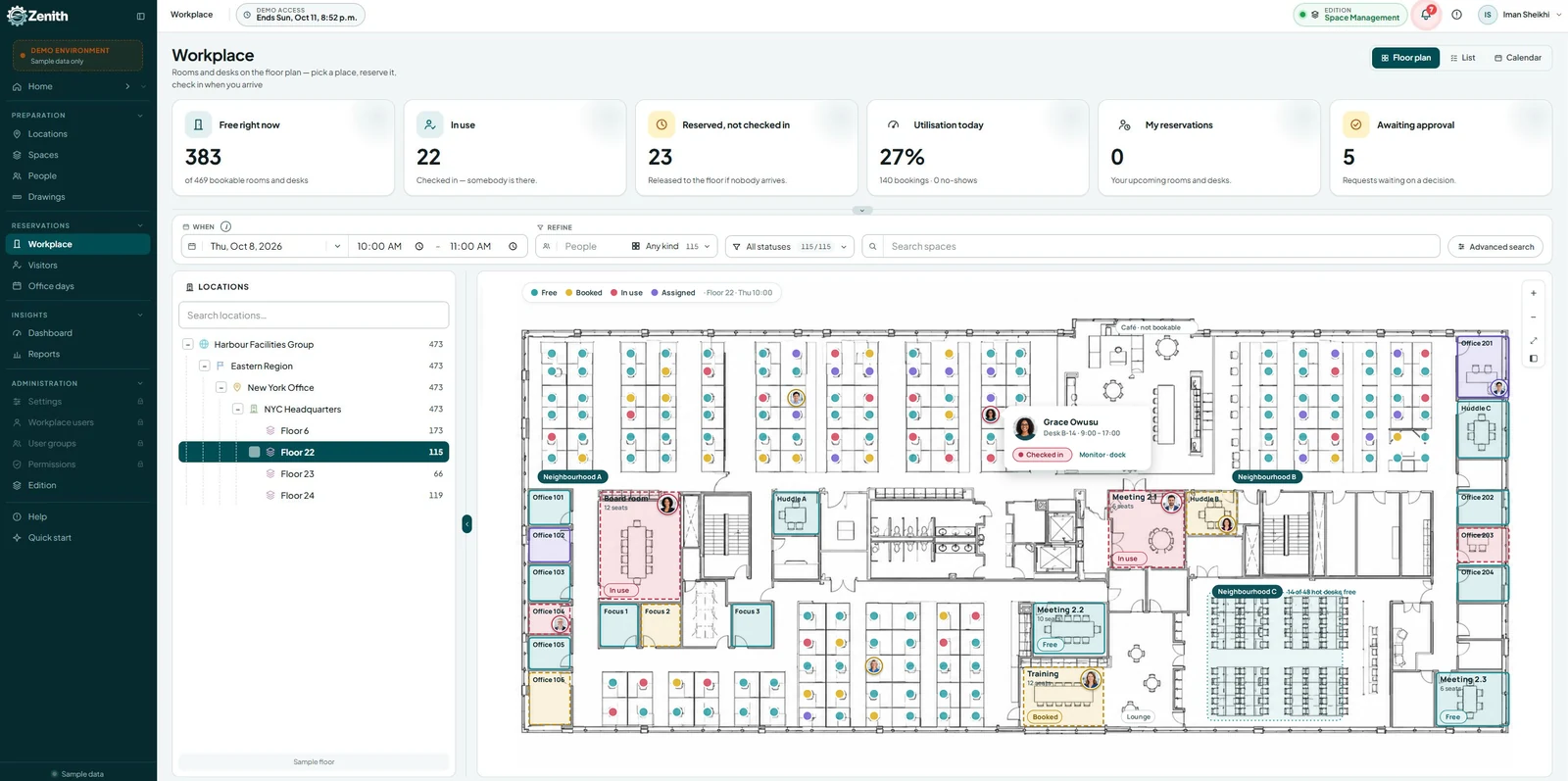
Zenith Space Scheduler is designed for straightforward configuration, calendar integration, and intuitive booking experiences for desks, hoteling, meeting rooms, and huddle spaces. Its strengths for a low‑disruption rollout include:
- Ease of use — Calendar and map views that match common user workflows, reducing training time.
- Flexible configuration — Define room types, amenities, and booking rules without heavy IT involvement.
- Calendar integrations — Works with corporate calendars to prevent double bookings and keep schedules synchronized.
- Scalable deployment — Pilot‑to‑enterprise capabilities that support phased rollouts and multi‑site management.
- Support and onboarding — Vendor resources, demos, and documentation to accelerate adoption.
How Zenith fits the plan: Use Zenith for the pilot configuration, leverage its calendar sync during the pilot, and scale with its admin tools and reporting as you expand. The product’s simplicity shortens the learning curve and reduces the operational burden on IT and facilities teams.
Example rollout scenario (concise case)
Company: 600‑person professional services firm
Goal: Reduce meeting room conflicts and enable hybrid work hot‑desking.
Approach: Pilot on two floors (sales and consulting), configure Zenith with meeting room tags (AV, capacity), integrate with Exchange, train champions, run pilot for 6 weeks.
Outcome: Meeting conflicts dropped 65%, desk utilization rose 28%, and employee satisfaction with booking rose from 54% to 82% in three months. (Hypothetical scenario based on typical outcomes reported by organizations using space schedulers.)
Common pitfalls and how to avoid them
- Skipping a pilot — Leads to unanticipated policy and integration issues. Always pilot.
- Under‑communicating — Employees need clear, repeated messaging about what changes and why.
- Overcomplicating rules — Start simple; complexity can be added later.
- Ignoring analytics — Data drives better space decisions; don’t let dashboards go unused.
- No governance — Without owners, policies drift and misuse increases.
FAQ
What is the minimum viable pilot size?
A pilot should include enough users to represent different workflows (e.g., 50–150 people across 1–3 floors). This balance surfaces common issues without overwhelming support resources.
How long should a pilot run?
Plan for 4–8 weeks of active pilot use plus 2 weeks for analysis and iteration. That timeframe captures behavior patterns and allows meaningful adjustments.
Will a space scheduler replace my calendar?
No. A modern scheduler integrates with calendars to prevent double bookings and provide a single source of truth for room and desk availability.
How do we handle no‑shows?
Options include automated reminders, check‑in requirements, and automatic release of unclaimed bookings after a grace period. Start with reminders and a short grace period before adding penalties.
What integrations are essential?
Calendar sync, SSO, directory services, and basic analytics exports are essential. Sensor or visitor system integrations are optional and can be phased in.
How do we measure ROI?
Track utilization, conflict reduction, real estate cost per FTE, and employee satisfaction. Translate utilization gains into avoided real estate costs over 12–24 months.
Can Zenith support multi‑site rollouts?
Yes. Zenith is designed to scale across locations with centralized admin controls and site‑level configuration.
What training works best?
Short videos, one‑page quick guides, and live drop‑in sessions with champions produce the fastest adoption. Peer‑led sessions are particularly effective.
Final checklist before you flip the switch
- Pilot success metrics met and documented.
- Integrations validated in a production‑like environment.
- Champions trained and support hours scheduled.
- Communications calendar published.
- Governance roles are assigned, and the KPIs dashboard is live.
- Contingency plan for manual booking in case of outage.