


Introduction
Delivering world-class facility management in Canada demands more than spreadsheets and paper work orders. With harsh climates, multi-site footprints, strict regulatory frameworks, and bilingual requirements, facility teams need a robust computerized maintenance management system (CMMS).
In this post, we explore the Top CMMS Features that empower Canadian facilities to optimize asset uptime, reduce costs, and maintain compliance. We’ll also dive into how Zenith delivers each feature in a single, unified platform and answer your most pressing questions in our FAQ section.
Why Canadian Facilities Need Specialized CMMS Functionality
Canadian facilities face unique challenges compared to other markets. Understanding these imperatives helps you evaluate when a CMMS truly supports your organizational goals.
- Diverse Climates and Geographies
From Arctic-region mining operations to urban high-rises in Toronto, equipment sees extreme temperature swings and travel distances that stress assets and crews. - Regulatory Compliance Across Provinces
Health and safety standards such as WHMIS, CSA Z462, and provincial energy codes require rigorous documentation, reporting, and audit trails. - Bilingual and Multicultural Operations
Quebec’s language laws mandate French interfaces and documentation, while English predominates elsewhere. - Distributed, Multi-Site Portfolios
Managing campuses, branch offices, warehouses, and remote sites under one roof demands scalability, centralized visibility, and flexible user roles. - Energy and Sustainability Goals
With carbon-reduction targets and peak-demand charges, facilities must monitor energy usage, optimize equipment schedules, and report on savings.
Choosing a CMMS that natively addresses these needs ensures your workforce spends less time on manual processes and more time optimizing performance.
Core Top CMMS Features
Below, we unpack each Top CMMS Feature that modern Canadian facilities rely on to boost reliability, compliance, and ROI.
1. Asset Management
Centralized asset repositories store vital information—serial numbers, warranty details, service history, and preventive maintenance plans.
- Hierarchical asset hierarchy (parent/child relationships)
- Real-time location tracking (barcodes/RFID)
- Customizable asset attributes and lifecycle statuses
2. Preventive Maintenance Scheduling
Automated scheduling prevents unexpected breakdowns by generating work orders based on runtime hours, calendar dates, meter readings, or sensor data.
- Dynamic PM frequency (time-based, usage-based)
- Trigger alerts via email, SMS, or mobile push
- Integration with IoT and building automation systems
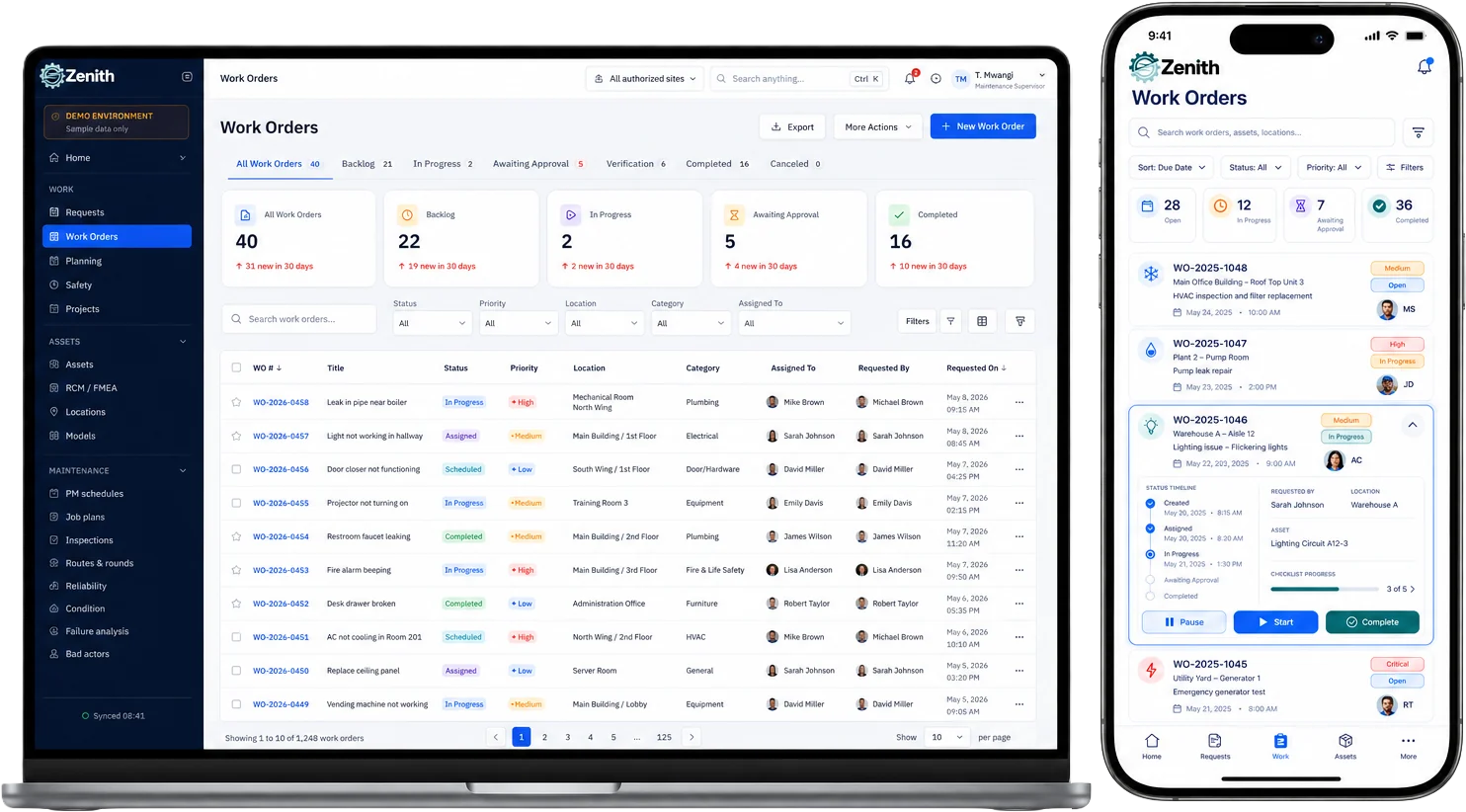
3. Work Order Management
Streamlined creation, assignment, and tracking ensures timely repairs and clear accountability.
- Custom workflows (approval chains, priority levels)
- Technician skill matching and shift scheduling
- Detailed labor, parts, and cost tracking
4. Inventory and Procurement Control
Avoid stockouts and overstocking through real-time inventory visibility and reorder point automation.
- Minimum/maximum levels, safety stocks
- Automated purchase requisitions and PO issuance
- Vendor performance tracking and contract linkage
5. Mobile Accessibility
Enable field technicians to access work orders, asset information, and parts inventory on rugged smartphones or tablets—online or offline.
- Native iOS and Android apps
- Offline data capture with sync upon reconnection
- GPS-enabled time stamps and travel logging
6. Reporting and Analytics
Data-driven insights uncover trends, pinpoint bottlenecks, and justify budget requests.
- Standard dashboards (MTBF, MTTR, compliance rates)
- Ad-hoc report builder with pivot tables and charts
- Export to CSV, PDF, or integration with BI tools
7. Regulatory Compliance Management
Built-in checks and audit trails reduce risk and demonstrate due diligence.
- Automatic log of every action (who, what, when)
- Document management for certifications, permits, and manuals
- Customizable fields for safety inspections and environmental checks
8. Vendor and Contract Management
Simplify outsourcing, ensuring vendor compliance and on-time deliveries.
- Centralized vendor database with contact info
- Contract terms, renewal alerts, and SLA tracking
- Performance scorecards and spend analysis
9. IoT and Building Systems Integration
Connect sensors, meters, and building automation systems (BAS) to trigger CMMS actions.
- Real-time alerts for threshold breaches (temperature, vibration)
- Automated generation of corrective work orders
- Dashboard overlays of live sensor data
10. Energy Management
Monitor and optimize energy usage to reduce costs and carbon footprint.
- Tariff modeling and peak-demand notifications
- Sub-meter integration and granular consumption reports
- Automated scheduling to shift non-critical loads
11. Document Management
Store and retrieve procedures, schematics, safety data sheets, and permits in context.
- Unlimited document attachments per asset or work order
- Version control and access permissions
- Full-text search across all documents
12. Multi-Site and Multi-Currency Support
Manage dispersed assets and financials in local currencies with consolidated reporting.
- Role-based access by site or department
- Currency exchange rates and consolidated budgeting
- Region-specific compliance templates
13. Bilingual Support
Deliver fully localized user experiences and documentation in English and French.
- User-selectable language preferences
- Auto-translation of common fields and screens
- Bilingual reporting templates
Feature Comparison Table
| Feature | Key Benefit | Why It Matters in Canada |
|---|---|---|
| Asset Management | Single source of truth for all equipment | Avoids duplicate records across provinces |
| Preventive Maintenance Scheduling | Reduces unplanned downtime | Essential in extreme climates |
| Work Order Management | Faster repairs, clearer accountability | Manages high volumes across locations |
| Inventory & Procurement Control | Optimizes stock levels, reduces costs | Prevents delays due to remote reorders |
| Mobile Accessibility | Field efficiency and real-time updates | Supports off-site and harsh-environment work |
| Reporting & Analytics | Data-driven maintenance strategies | Demonstrates compliance to regulators |
| Regulatory Compliance Management | Audit trails for inspections | Simplifies WHMIS and CSA audits |
| Vendor & Contract Management | Better outsourcing results | Ensures SLAs for national service partners |
| IoT & Building Systems Integration | Proactive issue detection | Ties into smart-building initiatives |
| Energy Management | Lower utility bills and emissions | Meets provincial carbon-reduction targets |
| Document Management | Quick access to critical instructions | Supports bilingual manuals and safety docs |
| Multi-Site & Multi-Currency | Consolidated control, local flexibility | Manages budgets across provinces |
| Bilingual Support | Inclusive user experience | Meets Quebec’s language compliance |
Best Practices for Selecting the Right CMMS
Choosing the ideal CMMS solution involves more than feature checklists. Follow these steps to ensure you select a platform that delivers maximum value:
- Define Your Objectives
Clearly articulate goals—reduce downtime, optimize spare parts inventory, improve audit scores, or lower energy consumption. - Assess Current Processes
Map out workflows, identify bottlenecks, and inventory existing systems (spreadsheets, ERPs, BAS). - Prioritize Top CMMS Features
Rank features by impact versus implementation complexity, focusing first on high-ROI capabilities. - Engage Stakeholders
Involve maintenance technicians, safety managers, procurement, IT, and finance to gather requirements and secure buy-in. - Request Demonstrations and Trial Access
Validate user experiences, mobile performance, reporting, and integrations with your existing systems. - Evaluate Total Cost of Ownership
Factor in subscription fees, implementation services, data migration, training, and ongoing support costs. - Review Vendor Roadmaps and Support
Verify commitment to Canadian regulatory updates, bilingual enhancements, and continuous platform innovation.
How Zenith Delivers These Top CMMS Features
Zenith was built from the ground up to address the real-world needs of Canadian facility managers. Here’s how we transform those Top CMMS Features into everyday efficiency gains:
- Unified Architecture
All modules—maintenance, inventory, energy monitoring, analytics—live on one cloud platform, eliminating integration headaches and data silos. - Rapid Deployment
Preconfigured templates for WHMIS, CSA, and provincial safety inspections accelerate go-live by weeks, not months. - Native Bilingual Experience
From the login screen to report headers, every interface element is available in English and French—no third-party plugins required. - Mobile-First Design
Offline-capable mobile apps keep technicians productive in basements, tunnels, and remote sites. - Scalability for Multi-Site Enterprises
Role-based dashboards ensure head office sees consolidated KPIs, while local teams manage site-specific work orders. - IoT-Ready Framework
Zenith’s open APIs connect seamlessly to sensors, gateway devices, and building automation systems for proactive alerts. - Expert Canadian Support
Dedicated regional onboarding and help-desk teams understand local regulations and facility challenges.
| Feature | Description | |
|---|---|---|
| ✔ | Unified Architecture | All modules—maintenance, inventory, energy monitoring, analytics—live on one cloud platform, eliminating integration headaches and data silos. |
| ✔ | Rapid Deployment | Preconfigured templates for WHMIS, CSA, and provincial safety inspections accelerate go-live by weeks, not months. |
| ✔ | Native Bilingual Experience | From the login screen to report headers, every interface element is available in English and French—no third-party plugins required. |
| ✔ | Mobile-First Design | Offline-capable mobile apps keep technicians productive in basements, tunnels, and remote sites. |
| ✔ | Scalability for Multi-Site Enterprises | Role-based dashboards ensure head office sees consolidated KPIs, while local teams manage site-specific work orders. |
| ✔ | IoT-Ready Framework | Zenith’s open APIs connect seamlessly to sensors, gateway devices, and building automation systems for proactive alerts. |
| ✔ | Expert Canadian Support | Dedicated regional onboarding and help-desk teams understand local regulations and facility challenges. |
Frequently Asked Questions about Zenith
What makes Zenith stand out among Top CMMS Features?
Zenith combines all critical modules—asset management, preventive maintenance, inventory control, energy monitoring, and compliance—into one unified platform. Its native bilingual support, rapid Canadian-focused templates, and IoT-ready architecture set it apart from generic CMMS offerings.
How does Zenith handle bilingual requirements?
Zenith’s interface and reporting tools are fully localized in English and French. Administrators can assign preferred languages per user, and all built-in templates (work orders, inspections, manuals) auto-translate, ensuring compliance with Quebec’s language laws and seamless adoption across Canada.
Can Zenith integrate with our existing building automation systems?
Yes. Zenith features an open REST API and supports MQTT and OPC UA protocols. You can ingest real-time sensor data—temperature, humidity, vibration—and configure automated work orders when thresholds are breached.
What is the typical implementation timeline?
Most Canadian organizations go live within 4–6 weeks thanks to Zenith’s prebuilt compliance templates and standard data-migration wizards. Large, multi-site rollouts may take up to 3 months, including training and UAT cycles.
Does Zenith support offline fieldwork?
Absolutely. Our native iOS and Android apps allow technicians to view, update, and close work orders even without cellular or Wi-Fi. Data syncs automatically when connectivity is restored.
How does Zenith help reduce maintenance costs?
By automating preventive maintenance schedules, optimizing spare parts inventory, and delivering data-driven insights, Zenith helps organizations reduce unplanned downtime by up to 35 percent and cut inventory carrying costs by 20 percent.
What pricing models are available?
Zenith offers flexible subscription tiers—Starter, Professional, and Enterprise—priced per module and per user. All plans include hosting, upgrades, and Canadian-based support. Contact our sales team for a customized quote.
Is training and support included?
Yes. Every subscription includes live onboarding sessions, role-based training workshops, and access to our online knowledge base. Our Canadian help-desk team is available 24/5 to resolve issues and guide best practices.
Conclusion
Selecting the right CMMS is critical for Canadian facilities striving to maximize uptime, ensure compliance, and meet sustainability targets. By focusing on the Top CMMS Features—asset and work order management, preventive maintenance automation, inventory control, mobile access, bilingual support, regulatory compliance, reporting, and IoT integrations—you empower your teams to do more with less.
Zenith delivers all these features in one cohesive platform designed specifically for the Canadian market. Ready to transform your facility maintenance program? Request a personalized demo of Zenith today and discover how the right CMMS can drive performance, transparency, and ROI across your entire portfolio.